iDefinition
What is certification tracking software?
Certification tracking software keeps a record of every employee certification and license with its expiry date, reminds people before anything lapses, collects the renewed certificates, and shows who is missing what for their role. ExpirePilot does this for small and mid-sized safety, field and healthcare teams of about 20 to 500 people.
!The problem
Spreadsheets miss expiry dates. Inspectors don’t.
Most teams track certifications in a spreadsheet until one slips through. A forklift certification lapses, a nurse’s license expires mid-shift, or an OSHA card can’t be found during an inspection. Then your crew gets pulled off the job, the audit fails, or the fine arrives.
24%of employed people in the US held an active professional certification or license in 2024. Source: U.S. Bureau of Labor Statistics
A spreadsheet can’t remind anyone, chase renewals or show who’s missing what. ExpirePilot does all three automatically.
You’ve outgrown your spreadsheet if:
- You track more than 20 people
- You manage more than one site or team
- Different roles need different certifications
- You have an audit or inspection coming up
- You’ve found an expired certification after the fact
vsComparison
Spreadsheet vs certification tracking software
A spreadsheet stores dates. Certification tracking software acts on them.
| Capability | Spreadsheet | ExpirePilot |
|---|---|---|
| Reminds people before expiry | No | 90, 60, 30 and 7 days, or your own schedule |
| Collects renewed certificates | You chase by email | No-login upload link, you approve |
| Shows who’s missing what by role | Manual cross-checking | Live, by role |
| Tells a manager when nobody acts | No | Automatic escalation |
| Keeps the certificate file | Separate folders | Stored with the record |
| Proves you followed up | No history | Log of every reminder sent |
| Audit packet | Hours of copying | One download (.zip) |
| Cost | Free, plus admin time | Free plan, paid from $15/month |
01Reminders
Track CPR, OSHA, forklift, CDL and nursing licenses in one place
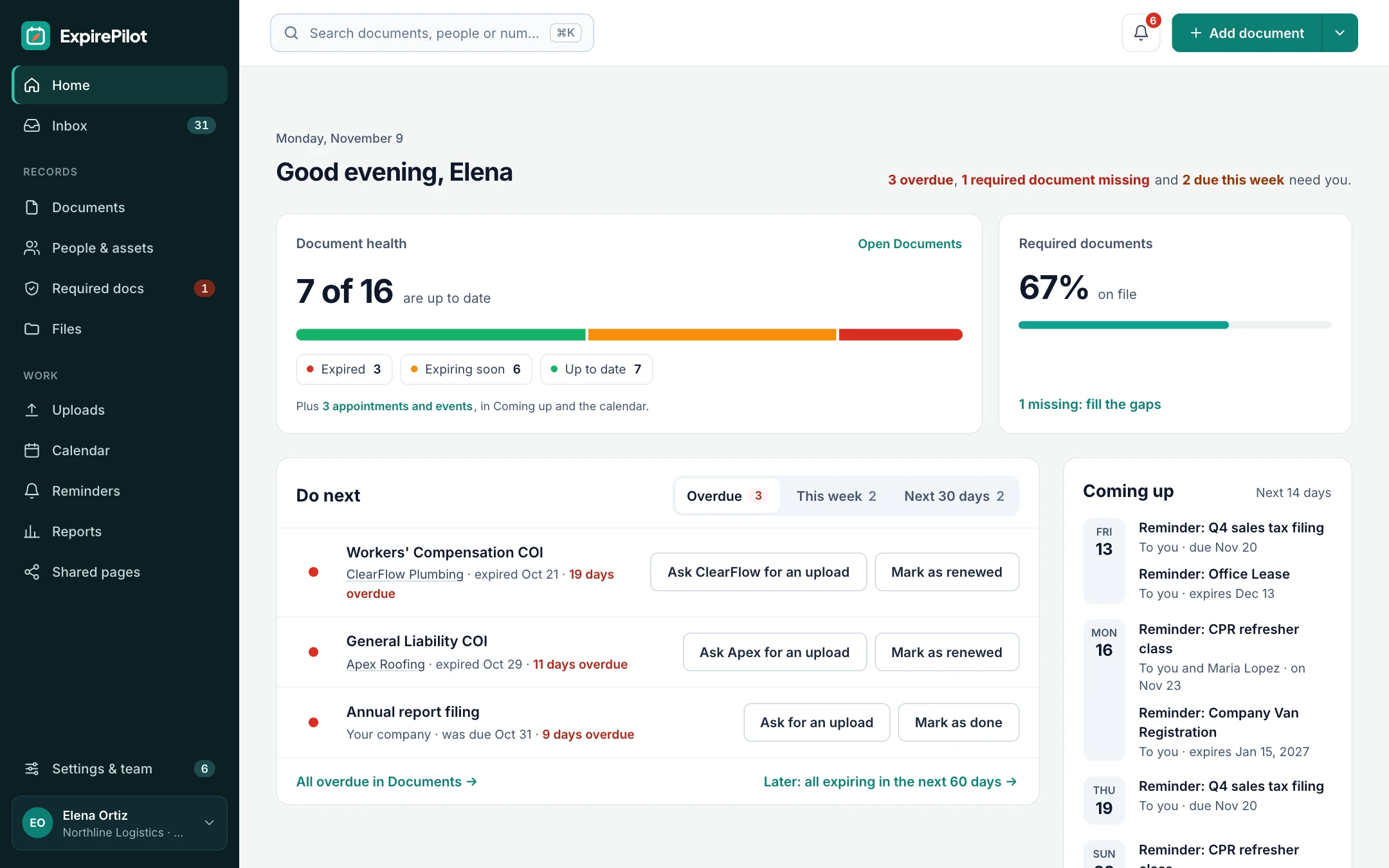
Add every certification your team holds, from safety cards to professional licenses, and ExpirePilot keeps an eye on the dates for you. Each employee gets reminders 90, 60, 30 and 7 days before a certification expires, so your renewals happen on time. Keep the standard schedule, or build your own and pick it for any certification.
Construction and warehouse teams use it for safety certification tracking. Clinics use it for nursing licenses and CPR, and fleets use it for CDLs and medical cards.
CPR / BLSFirst AidOSHA 10OSHA 30ForkliftCDLDOT Medical CardRN / LPN LicenseFood HandlerConfined SpaceFall ProtectionCustom certifications

↗Escalation
If it still isn’t renewed, their manager hears about it
If a certification still isn’t renewed, ExpirePilot tells the employee’s manager before the deadline, then your Owners and Admins, and keeps following up until it’s handled. Everything stops once the renewal is approved.
| When | Who is notified | How |
|---|---|---|
| 90, 60, 30 and 7 days before | The employee, plus the person who added the certification | Email with an upload link |
| Up to 30 days before (you choose) | The employee’s manager | |
| The day after it expires | Your company’s Owners and Admins | |
| After expiry, every few days (you choose) | The usual reminder recipients, until it’s renewed |
Reminders go by email on every plan, including Free, in English or Spanish. Text message reminders are coming soon.
Stop checking dates. ExpirePilot checks them for you.
02No-login uploads
Employees upload renewed certificates themselves, no login needed
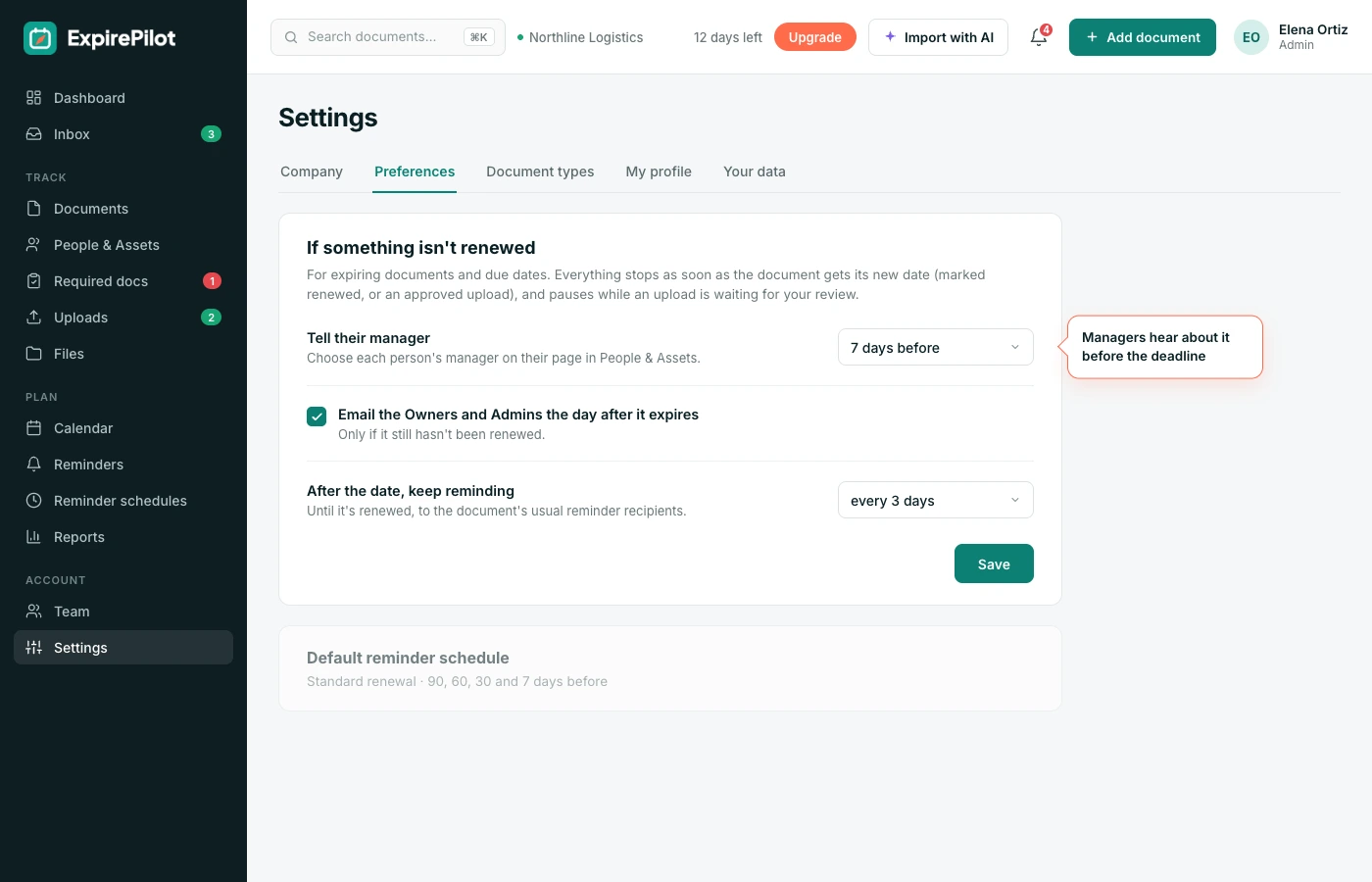
When a certification is due, your employee gets a secure link by email. They open it on their phone, snap a photo or upload the PDF, and their record updates. They don’t need an app, a password or an account.
You stop chasing paper, and employees spend a minute on it instead of a trip to the office.
- Get the linkThe reminder includes a personal upload link.
- Upload the certificateTake a photo or attach a PDF from your phone or computer.
- DoneThe record updates and the admin is notified.
Renewals come to you, not the other way around.

03Requirements by role
Set required certifications by role and see who’s missing what
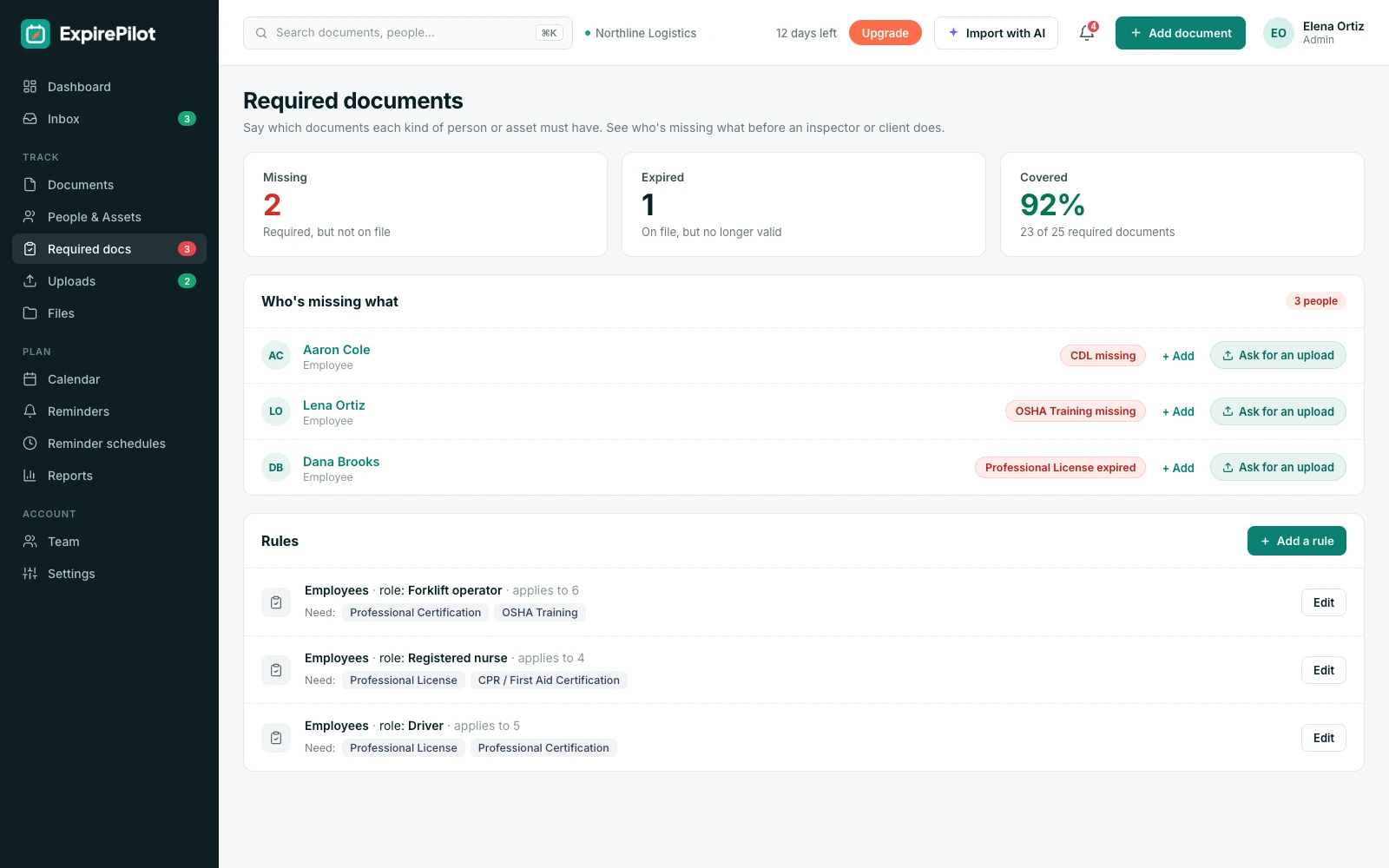
Tell ExpirePilot which certifications each role needs, like forklift operator, RN or driver. When you assign an employee to a role, their requirements come with it. You can see right away who’s fully covered, who has something expiring soon and who’s missing a certification altogether.
No more cross-checking job titles against your spreadsheet before you schedule a shift or send a crew out.
It works as a live compliance dashboard: every certification shows as up to date, expiring soon, expired or missing. Change someone’s role and their requirements change with it. Sites, vehicles and equipment can be tracked too, each with its own permits and inspections.
Know who’s cleared to work before the shift starts.
04AI scanning
AI reads your certificates for you
Upload a certificate, or let your employee upload it from their link, and ExpirePilot reads it for you. It pulls out your employee’s name, certification type, issue date and expiry date, then fills in your record. You review it and click confirm.
It works on PDFs, scans and phone photos, including the slightly crooked ones. Scan up to 25 certificates at once, or import your existing spreadsheet.
What it extracts
Who it belongs toCertification typeTitleCertificate or license numberIssue dateExpiry date
Set up hundreds of certifications in an afternoon, not a week.

05Audits & inspections
Hand inspectors an audit packet in minutes
When your inspector or auditor asks for proof, you shouldn’t have to dig through email and filing cabinets. ExpirePilot keeps every certificate, its expiry date and its reminder history in one place, so you can export exactly what they ask for: one person, one team or the whole company.
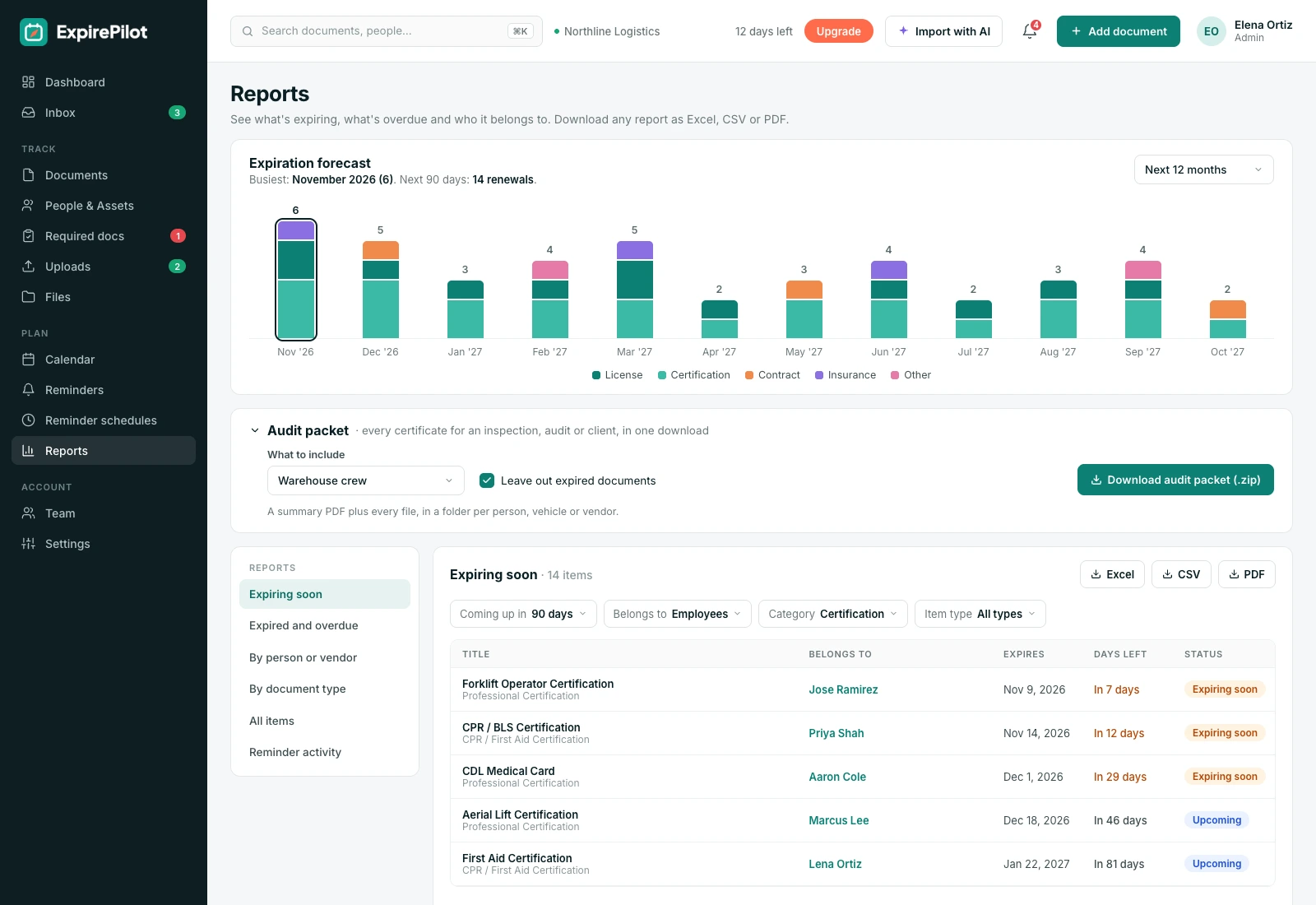
Need everything for one person or crew? Download an audit packet: a summary PDF plus every certificate file, in a folder per person, in one click.
Each report shows what’s current, what’s expiring and what has lapsed, along with a record of every reminder sent. That proves you were tracking renewals, not just hoping for the best.
- Every current certificate, with holder, type and expiry date
- Expiring and expired certifications, flagged clearly
- Reminder activity: who was reminded, when and how often
- Export as PDF for the inspector, or as Excel or CSV for your own records
Built for
OSHA inspectionsISO 45001 auditsClient and general contractor prequalificationJoint Commission and state licensing reviews
Walk into an inspection with the answers already printed.
§Standards
Compliance standards ExpirePilot helps you evidence
Most safety and quality standards ask the same two things: that people are qualified, and that you can prove it. Here’s how that maps to ExpirePilot.
| Standard | What it asks for | How ExpirePilot helps |
|---|---|---|
| OSHA 29 CFR 1910.178 (forklifts) | Trained and certified operators, with a performance evaluation at least every 3 years | Tracks each operator’s certification and evaluation date, reminds before it’s due, keeps the certificate on file |
| ISO 45001, clause 7.2 | Competent workers, with documented evidence of competence | Required certifications by role, a live gap view and an audit packet per person |
| ISO 9001, clause 7.2 | Competence for work affecting quality, with retained evidence | Certificates stored with their records, and reports by person or certification type |
| Joint Commission (healthcare) | Staff licenses and certifications verified and kept current | Tracks RN and LPN licenses, CPR / BLS and other credentials, and flags anything expired |
| DOT / FMCSA, 49 CFR 391.45 and 391.51 | Driver medical certificates renewed at least every 24 months; a qualification file for each driver | Tracks CDLs and DOT medical cards, and builds a per-driver packet in one download |
ExpirePilot helps you keep and present evidence. It doesn’t certify compliance or replace advice from your safety, quality or legal team.
⏱Reference
How often common certifications need renewing
A quick reference for setting up reminders. Always check the rules for your state, employer and issuing body.
| Certification | Typical renewal | Notes |
|---|---|---|
| CPR / BLS | Every 2 years | American Heart Association and Red Cross cards are valid for 2 years |
| First Aid | Every 2 years | Most Red Cross and similar courses |
| Forklift operator | Evaluation at least every 3 years | OSHA 1910.178; retraining sooner after an incident or a near miss |
| DOT medical card | Up to 24 months | Can be shorter if the medical examiner sets a shorter period |
| CDL | Varies by state, often 4 to 8 years | Track the medical card separately |
| RN / LPN license | Often every 2 years | Set by each state board of nursing |
| OSHA 10 / OSHA 30 | No federal expiry | Some states, cities and employers require refresher training, often every 5 years |
| Food handler card | Often 2 to 5 years | Set by state or county |
◎Industries
Certification tracking for field, safety and healthcare teams
Built for teams of about 20 to 500 people who need certificates current, without an enterprise rollout.
Construction
Keep crews on site
A general contractor asks for proof of OSHA 30, fall protection and first aid before your crew starts. Required docs by role shows who’s cleared, and the audit packet goes over in one download. Reminder emails can go out in Spanish.
Healthcare
No lapsed licenses mid-shift
A clinic tracks RN licenses and CPR / BLS for every nurse. Reminders start 90 days out, managers hear about anything not renewed, and expired credentials show up in red before the schedule is set.
Fleet and transport
Drivers stay qualified
A delivery company tracks each driver’s CDL and DOT medical card. Drivers upload their new card from their phone, and you approve it before the date changes.
Manufacturing and warehousing
Ready for the ISO audit
A plant tracks forklift, confined space and lockout training by role. When the ISO 45001 or ISO 9001 auditor asks for evidence of competence, the report is ready.
Contractors and subcontractors can be tracked too, alongside their insurance certificates (COIs). See everything ExpirePilot tracks →
?Which tool do you need?
Certification tracking vs LMS vs HRIS
They’re often confused. Many teams use more than one.
| Certification tracking software | LMS (learning management system) | HRIS | |
|---|---|---|---|
| Main job | Keep certifications and licenses current | Deliver and record training courses | Store employee records, payroll and benefits |
| Expiry reminders | Yes, to the employee, manager and admins | Usually only for its own courses | Rarely |
| Certificates from outside providers | Yes, uploaded or scanned | Often not | Sometimes, as attachments |
| Who’s missing what by role | Yes | Course completion only | Rarely |
| Audit evidence | Reports and an audit packet | Course completion reports | HR reports |
| Best for | Safety, field and healthcare credentials | Running your own training | Core HR |
Certification management software usually goes further, into issuing and accrediting credentials. Certification tracking, which ExpirePilot does, focuses on keeping the certifications your people already hold current.
→Getting started
Up and running the same day
No sales call, no implementation project.
Step 1 · About 15 minutes
Bring in your certifications
Import your spreadsheet, or scan up to 25 certificates at once and let AI fill in the details for you to check.
Step 2 · About 10 minutes
Set roles and requirements
Say which certifications each role needs. ExpirePilot shows who’s missing what straight away.
Step 3 · Automatic
Reminders run themselves
Reminders, upload links and escalations go out on schedule. You approve renewals as they come in.
⇄Integrations
Works with the tools you have
ExpirePilot doesn’t connect directly to HRIS or LMS systems such as Workday, BambooHR or Moodle yet. Most teams don’t need it to get started:
- Import a spreadsheet exported from any HRIS or LMS (Excel or CSV)
- Google Calendar sync, plus a calendar link for Outlook and Apple Calendar
- Export any report as Excel, CSV or PDF, or download everything at once
A public API and Zapier connection are on our roadmap.
🔒Security
Your records stay private
- Each company’s records and files are kept separate
- Certificates are stored encrypted on Amazon Web Services and open only through short-lived secure links
- Automatic backups cover the last 35 days
- Owner, Admin, Member and Viewer roles control who sees and changes what
- Export everything any time. No lock-in.
ExpirePilot stores staff credentials, not patient records. We aren’t SOC 2 audited yet; if your organization needs a SOC 2 report or a HIPAA business associate agreement, contact us before you sign up.
$Pricing
Free plan and pricing
You can track employee certifications for free. ExpirePilot’s free plan covers up to 20 certifications with email reminders and AI scanning, which is enough for a small crew or to try it out properly. No credit card, no time limit.
When you need more, paid plans start at $15 a month. Every new account also gets a 14-day free trial with Business-level features, so you can load your whole team before deciding.
Free plan includes
- Up to 20 certifications
- 1 editing user, plus unlimited view-only users
- Email reminders before every expiry
- 10 AI certificate scans a month
- Free forever. Nothing is deleted if you stay on it.
Basic
For one person keeping a business compliant.
or $165 a year (1 month free)
- 250 tracked items
- 1 user who can edit
- 50 AI scans / month
- 2 GB file storage
or try it free for 14 days
Professional
For small teams sharing renewals and compliance.
or $429 a year (1 month free)
- 800 tracked items
- 3 users who can edit
- 200 AI scans / month
- 10 GB file storage
or try it free for 14 days
Most popular
Business
For growing teams tracking many people and vendors.
or $869 a year (1 month free)
- 2,000 tracked items
- 6 users who can edit
- 500 AI scans / month
- 25 GB file storage
or try it free for 14 days
Enterprise
For larger companies and multiple departments.
or $1,749 a year (1 month free)
- 5,000 tracked items
- 15 users who can edit
- 1,500 AI scans / month
- 50 GB file storage
or try it free for 14 days
Pay yearly and get one month free. View-only users are free and unlimited on every plan, so managers and site leads can check status at no extra cost. Our prices are public: no sales call or quote needed.
14 days free · No credit card required · Drops to the free plan, not a bill
Start free, and pay only when your team outgrows it.
Certification tracking software keeps a record of every employee certification and license with its expiry date, reminds people before anything lapses, collects renewed certificates, and shows who is missing what for their role. ExpirePilot is certification tracking software for small and mid-sized safety, field and healthcare teams.
The best certification tracking software is the one your team keeps up to date. Look for:
- Automatic reminders before each expiry, on a schedule you can change
- A way for employees to upload renewals themselves, without an account
- Required certifications by role, with a live view of who’s missing what
- Escalation to a manager when a reminder is ignored
- Audit-ready reports and a one-click evidence packet
- Public, predictable pricing, ideally with a free plan to try it
ExpirePilot does all six, with a free plan for up to 20 certifications and paid plans from $15 a month. It suits small and mid-sized teams in construction, healthcare, logistics and field services that have outgrown a spreadsheet.
If you want to track employee certifications, record each certification and its expiry date in one system, schedule reminders at least 90 days before each expiry, and keep a copy of every certificate. In ExpirePilot, you can upload certificates or import a spreadsheet, AI reads the holder, type and expiry date, and reminders go out automatically at 90, 60, 30 and 7 days. Employees upload renewed certificates from a link, and their records update after an admin confirms them.
Yes. ExpirePilot offers a free employee certification tracking plan that covers up to 20 certifications, email reminders and 10 AI certificate scans a month, with no time limit and no credit card. New accounts also get a 14-day free trial with Business features. Paid plans start at $15 a month for 250 certifications.
Certification tracking software ranges from free plans to several hundred dollars a month, and many enterprise tools only quote prices after a sales call. ExpirePilot’s prices are public: $0 on the free plan, then $15, $39, $79 or $159 a month for 250 to 5,000 certifications, with one month free on yearly billing. View-only users are free and unlimited on every plan.
Yes. ExpirePilot tracks any safety certification with an expiry or renewal date, including OSHA 10 and OSHA 30 cards, forklift operator certifications, CPR and first aid, CDLs and nursing licenses. For example, OSHA requires a forklift operator’s performance to be evaluated at least once every three years, and most CPR certifications are valid for two years. ExpirePilot sends reminders before each of those dates and shows which employees are missing certifications their role requires.
Yes. ExpirePilot uses a 90, 60, 30 and 7-day schedule by default, and you can build your own schedules and pick one for any certification. You also choose when a manager is told, whether Owners and Admins hear about anything expired, and how often reminders repeat after the date. Reminders go by email on every plan; text messages are coming soon.
No. Employees do not actually need an ExpirePilot account to upload certificates. Each employee receives a secure upload link by email, opens it on a phone or computer, and adds a photo or PDF of the renewed certificate. The certificate goes to that employee’s record, where an admin reviews and confirms it.
ExpirePilot can help with audits by keeping every certificate, expiry date and reminder sent in one place, ready to export. Admins can export a report by person or certification type as a PDF, Excel or CSV file, or download an audit packet: a summary PDF plus every certificate file, in a folder per person. That record of tracking and follow-up is the evidence OSHA inspectors, ISO 45001 auditors and general contractors typically ask for.
An LMS (learning management system) delivers and records training courses. Certification tracking software keeps certifications and licenses current, including ones earned outside your company, with expiry reminders, renewal uploads and a view of who is missing what by role. Many teams use both: the LMS for their own training, and ExpirePilot for credentials with expiry dates.
Not directly yet. ExpirePilot doesn’t connect to HRIS or LMS systems such as Workday, BambooHR or Moodle today. You can import a spreadsheet exported from any of them, sync dates to Google Calendar or add a calendar link to Outlook and Apple Calendar, and export reports as Excel, CSV or PDF. A public API and Zapier connection are on the roadmap.
Yes. You can add each site as a location with its own permits and inspections, give employees roles with the certifications they need, and filter reports by who a certification belongs to. View-only users are free and unlimited, so every site lead can check status without a paid seat.
Most teams can be up and running the same day. Import a spreadsheet or scan up to 25 certificates at once, set the certifications each role needs, and reminders start on their own. There is no sales call or implementation project.
Each company’s records and files are kept separate, certificates are stored encrypted on Amazon Web Services and open only through short-lived secure links, and automatic backups cover the last 35 days. Roles control who can see and change what, and you can export everything at any time. ExpirePilot isn’t SOC 2 audited yet and doesn’t store patient records.
Never miss another expiry date
Let ExpirePilot remind your employees, collect their renewed certificates and keep you ready for the next inspection.
No credit card required. Free plan available.