Enrollment maintenance for small practices
Provider Enrollment Software That Keeps Providers Billable
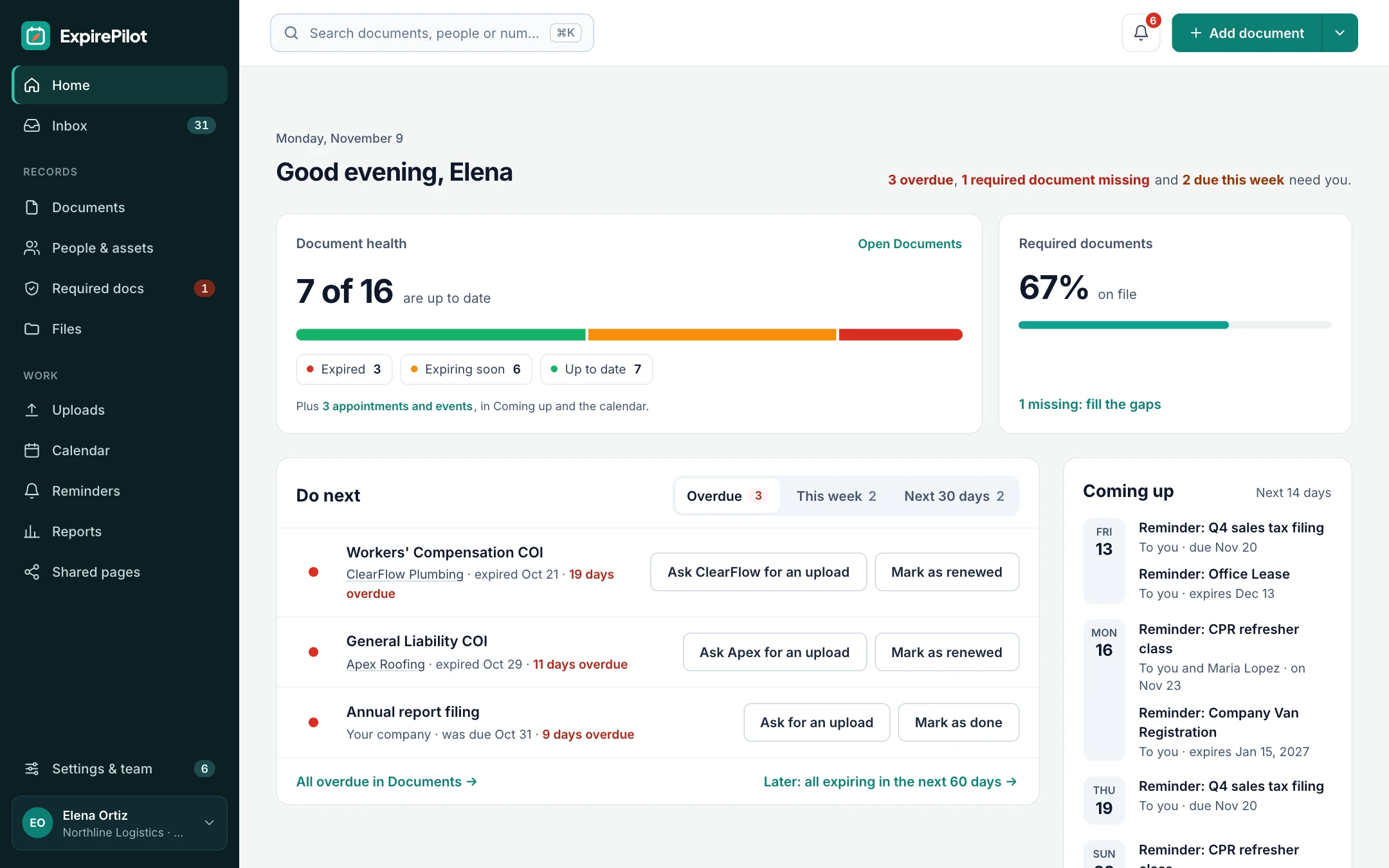
ExpirePilot is the deadline tracker for everything that keeps a provider enrolled once they’re approved: Medicare and Medicaid revalidation, CAQH re-attestation, payer recredentialing, roster and change-reporting due dates, state licenses, DEA registrations, board certifications and malpractice coverage. The right person gets a reminder well before each one is due, and the renewed document comes back to you without chasing. It works alongside your credentialing service, billing company or enrollment platform, with public prices and a free plan.
Free plan available. 14-day free trial, no credit card required.
Reminders at 90/60/30/7 daysRequired documents by provider roleAI reads licenses and certificates
iDefinition
What is provider enrollment software?
Provider enrollment software helps a practice or healthcare organization get its clinicians enrolled with Medicare, Medicaid and commercial insurance payers, and keep them enrolled. Full enrollment platforms prepare and submit payer applications and track their status. Keeping enrollment alive is a second job: every license, registration, certification and revalidation has its own due date, and missing one can stop a provider’s claims. ExpirePilot does that second job. It tracks every enrollment and credentialing deadline for every provider and reminds the right people in time. It doesn’t submit applications to payers, connect to CAQH or PECOS, or verify licenses with primary sources.
⇆Credentialing, enrollment and contracting
Is provider enrollment the same as credentialing?
No. Getting a provider paid takes three separate steps, and each one has to be kept current. Here’s the difference, and where ExpirePilot fits.
Credentialing checks that a provider is qualified: education, license, board certification, DEA registration, malpractice history and exclusions are verified, often to the NCQA standard. Provider enrollment (also called payer enrollment) sets that provider up with each payer, under the practice’s TIN and the provider’s NPI, so claims can be paid from an effective date. Contracting is the agreement between the practice and the payer that sets the rates and makes the provider in network (“participating”). Credentialing usually comes first, but all three have dates that come round again.
| Credentialing | Enrollment | Contracting | |
|---|---|---|---|
| The question | Is this provider qualified? | Can this payer pay claims for this provider? | On what terms, and are we in network? |
| Who’s involved | Hospitals, payers, credentialing organizations (CVOs) | Medicare (PECOS), state Medicaid, commercial payers, CAQH | The practice and each payer |
| What keeps it current | License, DEA and certification renewals; recredentialing | Revalidation, CAQH re-attestation, change reporting, rosters | Contract renewals, amendments and notice periods |
| What ExpirePilot does | Tracks every expiration, collects renewed documents | Tracks every revalidation, re-attestation and roster due date | Tracks contract end dates and notice deadlines |
| What ExpirePilot doesn’t do | Primary source verification, exclusion checks, privileging | Submitting applications, payer status tracking, CAQH or PECOS sync | Rate negotiation or fee schedule analysis |
!The problem
Most lapsed enrollments are found by a denied claim.
A revalidation letter goes to an old address. A CAQH profile goes unattested for a month. A DEA registration lapses while the provider is on vacation.
Nobody notices until claims start coming back denied or the payer’s portal shows the provider as inactive. Medicare can deactivate billing privileges when a revalidation isn’t submitted on time, and services in the gap before reactivation may never be paid. With a commercial payer, a lapse can mean starting a new application and waiting months again. The dates were never secret. They were just spread across payer letters, portals, a credentialing spreadsheet and one person’s inbox.
A spreadsheet can store a revalidation date. It can’t tell anyone it’s coming up. ExpirePilot does.
You need a deadline tracker if:
- You’ve had claims denied because a provider’s enrollment or credential lapsed
- Revalidation and recredentialing dates live in letters, portals and email
- CAQH re-attestation depends on someone remembering every 120 days
- One person in the office holds all the dates in their head or their spreadsheet
- You can’t say which providers have something due next quarter
⏱Timelines
How long does provider enrollment take?
Typically 60 to 120 days per payer from a complete application, and longer when a payer asks for more information. That’s why a lapse hurts: if an enrollment is deactivated or terminated, you can be back at the start of that queue.
Two dates matter once a provider is approved. The effective date is when the payer starts paying claims; Medicare generally lets physicians and practitioners bill for up to 30 days before it, and many commercial payers won’t pay anything before it. Participating (“par”) status confirms the provider is in network. Record both in ExpirePilot: add each payer enrollment as an item for the provider, with the payer ID or PTAN as its number, the effective date as its issue date and the revalidation or recredentialing date as its due date.
Use the calculator to see what a lapse would cost your practice. ExpirePilot can’t speed up a payer’s review. It makes sure you don’t need a new one.
⇵Delegated vs non-delegated
Delegated vs non-delegated enrollment, and the deadlines each creates
How a payer lets you enroll changes what you have to keep track of.
| Non-delegated | Delegated | |
|---|---|---|
| How it works | Each provider is enrolled with an individual application, and the payer credentials them itself | The payer delegates credentialing to your organization under an agreement; providers are added through roster updates |
| Typical for | Most small and mid-sized practices | Larger groups, health systems and some IPAs |
| Deadlines it creates | Each provider’s revalidation, recredentialing and CAQH re-attestation | Roster submissions (adds, terms and changes), the yearly delegation audit, the delegation agreement renewal, and recredentialing of every provider on your own cycle |
| How to track it in ExpirePilot | A due date per provider per payer | Company-level due dates for rosters, audits and the agreement, plus each provider’s own documents |
ExpirePilot doesn’t build or submit rosters. It reminds whoever does, before each roster or audit is due.
✚Medicare
The Medicare enrollment lifecycle, and what to track at each step
Medicare enrollment doesn’t end at approval. These are the steps, and the dates each one leaves you to watch.
| Step | What happens | What to track in ExpirePilot |
|---|---|---|
| 1. NPI | Each provider gets an individual (Type 1) NPI in NPPES; a group or facility gets an organization (Type 2) NPI | Nothing expires, but keep the NPI confirmation on file with the provider |
| 2. Application | The provider applies in PECOS or on CMS-855I; a group enrolls on CMS-855B; reassigning benefits to the group uses CMS-855R | A follow-up due date while the application is pending with the Medicare Administrative Contractor (MAC) |
| 3. Approval | The MAC sets the effective date and issues a PTAN | The effective date and PTAN on the provider’s Medicare enrollment item |
| 4. Change reporting | Physicians and practitioners report changes of ownership, adverse legal actions and practice locations within 30 days, and other changes within 90 days | A due date as soon as a change happens, such as a move, a new location or a departure |
| 5. Revalidation | Every 5 years for most providers, every 3 years for DMEPOS suppliers | The revalidation due date, with reminders from 90 days out |
ExpirePilot doesn’t connect to PECOS or submit CMS-855 forms. It keeps the dates in front of the people responsible.
◇Which kind of tool do you need?
Full enrollment platform or deadline tracker?
Search for “provider enrollment software” and most results are large credentialing and enrollment suites. Check which job you have before you compare.
| Full enrollment and credentialing platform | Deadline tracker (ExpirePilot) | |
|---|---|---|
| Who it’s for | Health systems, large groups, credentialing teams and CVOs | Small and mid-sized practices, dental offices, staffing agencies, billing companies |
| The job | Fill in and submit payer applications, verify credentials, manage rosters | Don’t let any license, registration or revalidation lapse |
| Main features | Application workflows, payer status tracking, primary source verification, CAQH integration | Due dates, reminders, escalation, renewed documents, gaps by provider |
| Setup | Usually a sales process and an implementation project | Sign up and start the same day |
| Pricing | Usually quoted per provider | Public plans from $0 to $159 a month |
| ExpirePilot fits? | No | Yes |
If you need software to fill in and submit payer applications, ExpirePilot isn’t that tool. Many practices use a credentialing service or their billing company for submissions and ExpirePilot to make sure nothing they’ve already got lapses.
01Enrollment and credential reminders
Every provider, every deadline, and a reminder before it’s due
Add each provider once, with their role, email and manager. Then add their documents and deadlines: licenses, DEA and state controlled substance registrations, board certifications, malpractice insurance, life support certifications, and enrollment deadlines like Medicare revalidation, CAQH re-attestation and payer recredentialing. ExpirePilot emails the provider and anyone you add 90, 60, 30 and 7 days before each date, or on your own schedule in days, weeks or months.
Expiring documents are tracked as expirations; revalidations and re-attestations can be tracked as due dates. When something is renewed, mark it renewed: the new date takes over and the old one stays in the history. Reminder emails can go out in English or Spanish, and you can see whether each one was delivered and opened.
State medical licensesNursing licensesNP and PA licensesDEA registrationsState controlled substance registrationsBoard certificationsMalpractice insuranceBLS, ACLS and PALSMedicare revalidationMedicaid revalidationCAQH re-attestationPayer recredentialingHospital reappointmentCollaborative practice agreementsCME creditsCustom document types
↗Escalation
If nobody acts on it, their manager hears about it
Busy clinicians ignore emails. If a provider doesn’t act, ExpirePilot tells their manager before the due date, then your Owners and Admins the day after it lapses, and keeps following up until someone renews or archives it.
| When | Who is notified | How |
|---|---|---|
| 90, 60, 30 and 7 days before | The provider and anyone you add | |
| Before the due date (you choose when) | The provider’s manager | |
| The day after it lapses | Your company’s Owners and Admins | |
| After that, every few days (you choose) | The usual recipients, until it’s handled |
Reminders go by email on every plan, including Free. Recipients can snooze a reminder or hand it to a teammate from the email.
The cheapest reinstatement is the one you never need.
⌚Reference
How often provider enrollment and credentials come due
Typical cycles for the deadlines practices track most. Rules vary by state, payer and specialty, so always go by the date on the notice or document.
| Deadline | Typical cycle | Track it in ExpirePilot as |
|---|---|---|
| CAQH ProView re-attestation | Every 120 days | A due date, renewed after each attestation |
| Medicare revalidation | Every 5 years for most providers; every 3 years for DMEPOS suppliers | A due date from the CMS revalidation list or your notice |
| Medicaid revalidation | At least every 5 years; set by each state | A due date per state program |
| Commercial payer recredentialing | Every 36 months under the NCQA standard most payers follow | A due date per payer |
| CAQH payer access authorization | Review at each re-attestation, and when you join a new payer | Part of the CAQH re-attestation item, in its notes |
| Medicare change reporting | Within 30 days (ownership, adverse actions, practice location) or 90 days (other changes) | A due date when the change happens |
| OIG LEIE and SAM exclusion checks | Monthly is the common practice CMS has recommended | A monthly due date: mark it done and set the next one |
| Payer roster submissions | As your delegation agreement or payer requires, often monthly | A company-level due date per payer |
| Delegation audit | Usually yearly | A company-level due date per payer |
| State medical or nursing license | Usually every 1 to 3 years, by state | An expiration, with the license number |
| Licenses in other states (telehealth, IMLC, Nurse Licensure Compact) | Each state license on its own cycle | One expiration per license, so multi-state providers show every one |
| DEA registration | Every 3 years | An expiration, with the registration number |
| State controlled substance registration | Varies by state | An expiration |
| Board certification | Varies by board; often with continuing certification in between | An expiration |
| Malpractice insurance | Usually yearly | An expiration, with the certificate attached |
| BLS, ACLS and PALS | Usually every 2 years | An expiration |
Medicare publishes revalidation due dates on the CMS revalidation lookup. ExpirePilot doesn’t look them up for you: enter the date once and it handles the reminders.
☰Checklist
Provider enrollment document checklist
What payers usually ask for in an enrollment packet, which items expire, and how to keep each one ready in ExpirePilot.
| Document | Expires? | Keep it in ExpirePilot as |
|---|---|---|
| State license(s) | Yes | An expiration, with the license number and a copy |
| DEA and state controlled substance registrations | Yes | An expiration, with the registration number |
| Board certification | Yes | An expiration |
| Malpractice insurance face sheet | Yes, usually yearly | An expiration, with the certificate attached |
| CAQH ProView profile | Re-attest every 120 days | A due date |
| CV with work history (gaps explained) | No, but keep it current | A document that doesn’t expire, updated as needed |
| NPI confirmation | No | A document that doesn’t expire |
| W-9 | No, but redo it if the TIN or address changes | A company document that doesn’t expire |
| EFT and ERA enrollment forms, voided check | No | A company document that doesn’t expire |
| Diplomas and training certificates | No | A document that doesn’t expire |
Every file is attached to the provider it belongs to, so the whole packet downloads in one go as an audit packet.
02Find the gaps
See which providers are missing a document
Set the documents each role needs once: every physician needs a medical license, DEA registration, board certification and malpractice insurance; every nurse practitioner needs a license, DEA registration and collaborative agreement. The “who’s missing what” view then shows each provider as complete, due soon, expired or missing.
Mark a document as not needed for someone it doesn’t apply to, and request what’s missing in one click: the provider gets a link to upload it.
- Required documents by role: physician, NP, PA, nurse, hygienist or your own roles
- Missing, expired and due-soon items flagged on the dashboard
- A month-by-month chart of what’s coming due, to plan the credentialing workload
- Put a provider on hold while they’re on leave, without losing their records
03No-login uploads
Get renewed documents from providers without chasing
Reminders can include a secure upload link. The provider sends the renewed license, DEA certificate or insurance certificate as a PDF or a phone photo, and it lands in your review queue. No app, password or account needed.
Reminder emails also have one-click buttons, so a provider can mark it done or upload a file straight from their inbox.
- They get the linkIn the reminder, or you share it yourself.
- They upload the documentA PDF or a photo from their phone.
- You approve itThe new date takes over.
04AI scanning and setup
Load your providers’ documents in an afternoon
Drop in up to 25 licenses, certificates and insurance certificates at once. AI works out what each document is, reads the name, number and dates, and matches it to the right provider by name, or offers to add the provider if they’re new. You check each row before anything is saved. You can also import your existing credentialing spreadsheet.
Not sure what to track? The setup assistant suggests document types for healthcare, staffing and dental businesses, such as nursing licenses, BLS and ACLS, DEA registrations and malpractice insurance, and can tailor the list to your business with AI. You choose what to keep.
- AI scanning on every plan, including Free (10 scans a month)
- Spreadsheet import for providers and their documents (Excel or CSV)
- Starter lists for healthcare and staffing, and for dental
05Reports and audits
Answer “is everyone current?” in seconds
When a payer, a hospital or an auditor asks for a provider’s documents, download an audit packet: a summary PDF plus every attached file, in a folder per provider.
- Expiring soon, and expired or overdue
- By provider, with every item and its status
- By document type, such as every DEA registration
- Reminder activity: which reminders were sent, delivered or skipped
- Export any report as Excel, CSV or PDF
- A weekly summary email of what’s coming due
◎Who uses it
Built for practices without a credentialing department
For organizations tracking a handful to a few hundred providers, without an enterprise rollout.
Medical and specialty practices
One place for every provider’s deadlines
An office manager tracks each physician’s, NP’s and PA’s licenses, DEA registrations, board certifications, malpractice coverage, revalidations and CAQH re-attestations, and stops relying on one spreadsheet.
Dental offices
Dentists, hygienists and the X-ray unit
Track dental and hygienist licenses, DEA and state registrations, CPR certifications, continuing education and the office’s own equipment registrations in the same place.
Behavioral health and therapy groups
Licensed clinicians, many payers
Group practices with counselors, social workers and psychologists track each license and each payer’s recredentialing date, so no clinician drops out of network.
FQHCs and community health centers
Many payers, many programs
Track every clinician’s licenses and Medicaid revalidations, plus the center’s own registrations, grant-related deadlines and the exclusion checks your compliance plan calls for.
Telehealth and multi-state groups
Every state license in one place
See each provider’s licenses across states, including compact licenses, and every payer enrollment they hold, so no one treats patients in a state where their license has lapsed.
Healthcare staffing agencies
Ready before every placement
Track nurses’ licenses, BLS, TB tests and background checks before every placement, and send renewal requests through no-login upload links.
Billing, RCM and enrollment services
Every client’s providers, kept apart
Billing companies and enrollment services use tags or folders to keep each client practice’s providers apart, with one dashboard of what’s due next across all of them.
◍Outside the US
Not in the US? The deadlines work the same way
Most provider enrollment tools are built around US systems like CAQH and Medicare. ExpirePilot isn’t tied to any of them: it tracks dates and documents, so it works for any license, registration or payer agreement in any country.
Track professional registrations, practicing certificates, indemnity insurance, health insurer or hospital agreements and mandatory training, each with its own renewal date and document. Reminders can go out in English or Spanish.
Examples you can track
- Professional registration or practicing licence renewals
- Indemnity and malpractice insurance
- Agreements with insurers and hospitals
- Annual continuing professional development
- Life support and safeguarding training
Prices are in US dollars. ExpirePilot doesn’t connect to any national registry.
✓Buyer’s guide
What to look for in provider enrollment software
The questions worth asking any vendor, with honest answers for ExpirePilot.
| What to check | Why it matters | ExpirePilot |
|---|---|---|
| Reminders for every deadline | Revalidations, re-attestations and licenses all lapse on different cycles | Yes, with your own schedule and escalation |
| Required documents by role | Shows who is missing what before a payer does | Yes |
| Documents collected from providers | Chasing PDFs by email is where most time goes | Yes, no-login upload links and a review queue |
| Bulk AI document reading | Loading years of paperwork by hand takes days | Yes, 25 at a time, matched to each provider |
| Audit-ready exports | Payers and auditors ask for proof on short notice | Yes, reports and audit packets |
| Application submission and payer status tracking | Needed if you enroll providers in-house at volume | No |
| CAQH and PECOS integration | Saves re-keying for high-volume teams | No |
| Primary source verification and exclusion monitoring | Required for delegated credentialing | No |
| Delegated roster submission | Needed for delegated agreements | No, reminders for roster due dates only |
| Security certifications (SOC 2, HITRUST) | Some health systems require them from vendors | Not yet |
| Public pricing and same-day setup | Many platforms are quoted per provider after a sales process | Yes, from $0 a month |
If you outsource enrollment to a credentialing service or billing company, you still need to know what’s due and whether it was done. That’s the gap ExpirePilot fills.
→Getting started
Up and running the same day
No sales call, no implementation project.
Step 1 · About 10 minutes
Add your providers
Import providers from a spreadsheet with their role, email and manager, or add them one by one. Set which documents each role needs.
Step 2 · About 20 minutes
Add their deadlines
Import your credentialing spreadsheet or scan licenses and certificates with AI, then add revalidation and re-attestation due dates.
Step 3 · Automatic
Let the reminders run
Reminders, escalations and the weekly summary run on schedule. You act only when something needs a decision.
⇄What it connects to
Works next to the tools you have
ExpirePilot doesn’t connect to CAQH, PECOS, payer portals or your practice management system, and it doesn’t check licenses with state boards. It works alongside them:
- Import providers and documents from any system (Excel or CSV)
- Scan licenses and certificates with AI
- A private calendar link for Google Calendar, Outlook and Apple Calendar
- Post reminder summaries to a Slack or Microsoft Teams channel
- Export any report as Excel, CSV or PDF, or download everything at once
✓Security
Provider records stay private
- Each company’s records and files are kept separate
- Files are stored encrypted on Amazon Web Services and open only through short-lived secure links
- Automatic backups cover the last 35 days
- Owner, Admin, Member and Viewer roles control who sees and changes what
- Two-step verification for your account
- Export everything any time. No lock-in.
ExpirePilot is for provider documents, not patient records. It isn’t HIPAA-certified and we don’t sign Business Associate Agreements, so don’t upload patient health information. We aren’t SOC 2 audited yet.
@How reminders reach people
Email, calendar and a weekly summary
- Reminder emails, in English or Spanish, with delivery and open tracking
- Due dates in Google Calendar, Outlook or Apple Calendar through a private calendar link
- A weekly summary email of what’s coming due
- Escalation emails to managers, Owners and Admins
Text message reminders aren’t available yet. Today every reminder goes by email.
▢On the phone
Works in the browser on any phone
- Check a provider’s status between patients
- Photograph a license or card and let AI fill in the details
- Providers upload documents from their phone, without an account
- Mark a reminder done or upload a file from the reminder email
There’s no app to install from the App Store or Google Play.
$Pricing
Free plan and pricing
You can track provider deadlines for free. ExpirePilot’s free plan covers up to 20 tracked items, with unlimited providers, unlimited email reminders and AI scanning, which is enough for one or two providers or to try it out properly. No credit card, no time limit.
When you need more, paid plans start at $15 a month. Every new account also gets a 14-day free trial with Business-level features, so you can load every provider’s documents before deciding.
Free plan includes
- Up to 20 licenses, registrations or deadlines
- Unlimited providers and staff
- 1 editing user, plus unlimited view-only users
- Unlimited email reminders
- 10 AI document scans a month
- Free forever. Nothing is deleted if you stay on it.
Basic
For one person keeping a business compliant.
or $165 a year (1 month free)
- 250 tracked items
- 1 user who can edit
- 50 AI scans / month
- 2 GB file storage
or try it free for 14 days
Professional
For small teams sharing renewals and compliance.
or $429 a year (1 month free)
- 800 tracked items
- 3 users who can edit
- 200 AI scans / month
- 10 GB file storage
or try it free for 14 days
Most popular
Business
For growing teams tracking many people and vendors.
or $869 a year (1 month free)
- 2,000 tracked items
- 6 users who can edit
- 500 AI scans / month
- 25 GB file storage
or try it free for 14 days
Enterprise
For larger companies and multiple departments.
or $1,749 a year (1 month free)
- 5,000 tracked items
- 15 users who can edit
- 1,500 AI scans / month
- 50 GB file storage
or try it free for 14 days
Pay yearly and get one month free. Each license, registration or deadline counts as one tracked item, and the number of providers is unlimited. View-only users are free and unlimited on every plan, so practice managers and billing staff can check status at no extra cost. Our prices are public: no sales call or quote needed.
14 days free · No credit card required · Drops to the free plan, not a bill
A few days of claims you can still bill usually pays for a year.
Provider enrollment software helps healthcare organizations enroll their clinicians with Medicare, Medicaid and commercial payers and keep them enrolled. Full platforms prepare and submit payer applications and track their status. Deadline trackers like ExpirePilot make sure the licenses, registrations, revalidations and re-attestations that keep a provider enrolled never lapse.
No. Credentialing verifies that a provider is qualified: license, education, board certification, DEA registration and malpractice history. Provider enrollment registers that provider with each insurance payer so the practice can bill. Credentialing usually comes first, and both need to be kept current.
No. ExpirePilot doesn’t fill in or submit Medicare, Medicaid or commercial payer applications, track application status with payers, or connect to CAQH or PECOS. It tracks the deadlines that keep providers enrolled and credentialed, reminds the right people, and collects the renewed documents.
They’re the systems payers and practices use to register providers for billing. On the payer side, Medicare uses PECOS and each state runs its own Medicaid enrollment portal; many commercial payers use CAQH ProView. On the practice side, enrollment software or a credentialing service manages the applications, and a tracker like ExpirePilot manages the deadlines.
Full credentialing and enrollment platforms are usually quoted per provider, often after a sales call. ExpirePilot has public prices: a free plan for up to 20 tracked items, then $15, $39, $79 or $159 a month by the number of tracked items and editing users. View-only users are free and unlimited, and the number of providers is unlimited.
ExpirePilot has a free plan with no time limit: up to 20 tracked items, unlimited providers, unlimited email reminders and 10 AI scans a month. That fits one or two providers’ documents and deadlines, or lets you try it properly before paying.
CAQH ProView asks providers to re-attest every 120 days. In ExpirePilot, track it as a due date for each provider; when they’ve attested, mark it renewed with the next due date and the reminders start again.
Most Medicare providers and suppliers revalidate every 5 years, and DMEPOS suppliers every 3 years. CMS publishes due dates on its revalidation lookup. Enter each provider’s date in ExpirePilot and it reminds them, and their manager if needed, ahead of time.
Typically 60 to 120 days per payer once a complete application is in, and longer if the payer asks for more information. Keeping existing enrollments current avoids going through that wait again.
With non-delegated enrollment, each provider applies to the payer individually and the payer does the credentialing. With delegated enrollment, the payer lets your organization credential providers under an agreement and add them through roster updates, which brings its own deadlines: roster submissions, a yearly delegation audit and the agreement renewal.
It’s the date from which a payer will pay claims for a provider. Medicare generally allows physicians and practitioners to bill for up to 30 days before it; many commercial payers pay nothing before it. Record it with each enrollment so billing knows when a provider is ready.
A credentialing service or billing company handles the applications, but someone at the practice still needs to know what’s due, collect renewed licenses and certificates, and check it was done. ExpirePilot gives you that view and reminds both your team and your outside partner.
Get an NPI in NPPES, then apply through PECOS or on the CMS-855I (CMS-855B for a group, CMS-855R to reassign benefits). The Medicare Administrative Contractor reviews it, sets the effective date and issues a PTAN. After that, report changes within 30 or 90 days and revalidate every 5 years. ExpirePilot tracks those later deadlines; it doesn’t submit the application.
Yes. Reminders can include a secure upload link, so providers send a PDF or phone photo without an account. It goes to your review queue, and nothing changes until you approve it.
Yes. Set the documents each role needs and ExpirePilot shows who is complete, due soon, expired or missing, and lets you request what’s missing in one click.
ExpirePilot is built for provider documents such as licenses and certificates, not patient records. It isn’t HIPAA-certified and we don’t sign Business Associate Agreements, so don’t store patient health information in it.
Yes. It tracks dates and documents rather than connecting to US systems, so it works for professional registrations, indemnity insurance and payer or hospital agreements in any country. Reminders can be sent in English or Spanish.
Never lose a billable day to a missed deadline
Let ExpirePilot remind the right people before every revalidation, re-attestation and renewal, and keep every provider’s documents ready when a payer asks.
No credit card required. Free plan available.