Reminder email tracking
Know Who Ignored the Reminder
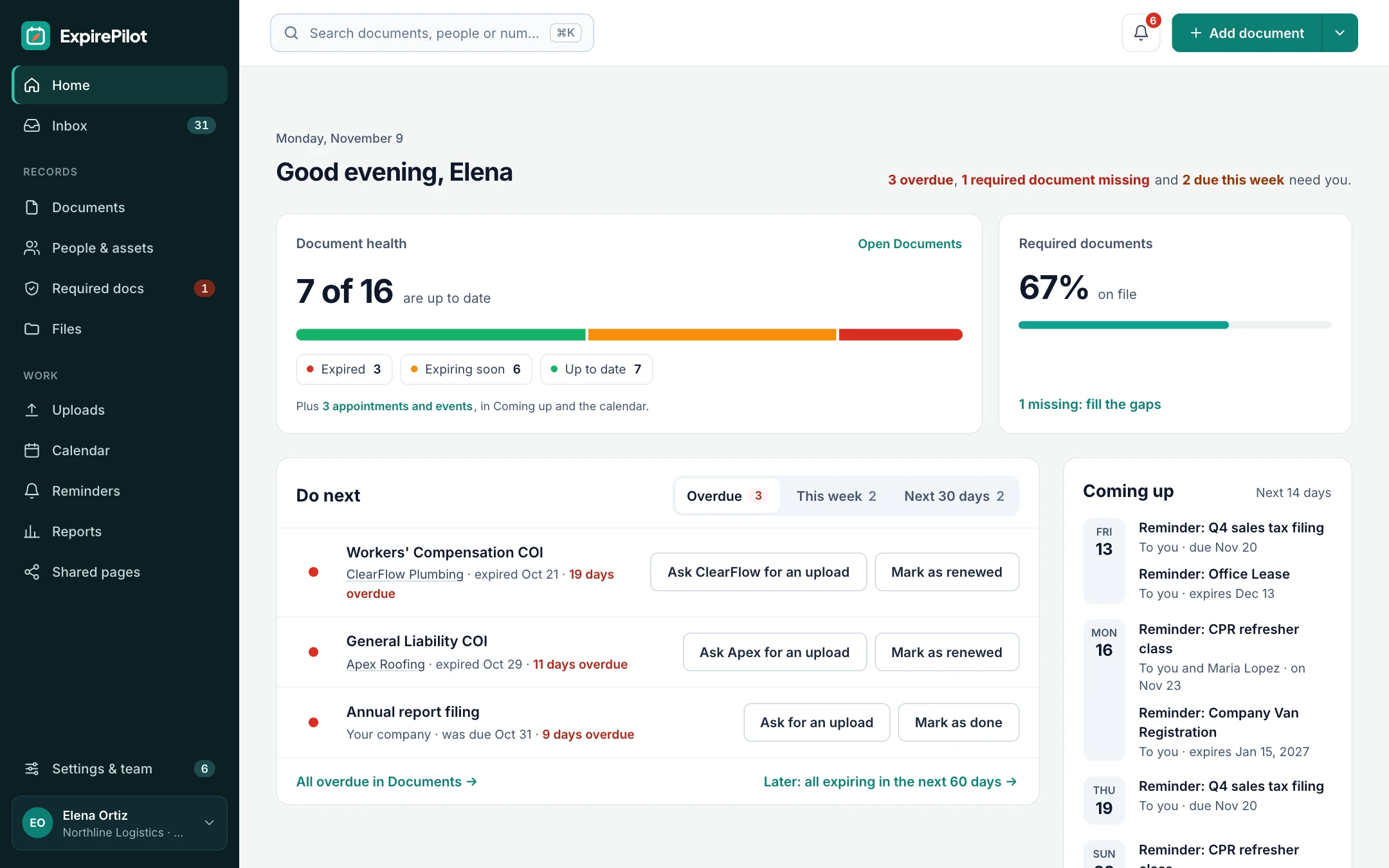
Sending a reminder isn’t the same as someone reading it. ExpirePilot shows whether each reminder was delivered, opened and clicked, flags email addresses that bounce, and keeps a log of every reminder, so you know exactly who to call before a deadline, and can prove you reminded them.
Free plan available. 14-day free trial, no credit card required.
Delivered, opened and clickedBad addresses flaggedA log of every reminder sent
iDefinition
What is reminder email tracking?
Reminder email tracking records what happened to each automated reminder after it was sent: whether it reached the inbox, whether it was opened and whether a link in it was clicked. It also catches addresses that bounce or report the email as spam, so reminders aren’t silently going nowhere. In expiration tracking, the result is a dated record of who was reminded about what, which doubles as proof for audits and disputes.
!The problem
You can’t follow up on a reminder you can’t see.
Most reminder tools send the email and forget it. You only find out it never arrived when the document has already expired.
A typo in a vendor’s address, a full mailbox or a spam filter can quietly stop every reminder to that person. And when an auditor or client asks whether you warned someone, “the system sends reminders” isn’t proof.
ExpirePilot shows what happened to every reminder, so a missed renewal is never a mystery.
Email tracking matters if:
- Reminders go to people outside your company
- You’ve discovered a contact’s email address was wrong months later
- You need to prove someone was reminded
- You want to call people who haven’t opened their reminder
- You’re worried reminders land in spam
→How it works
Every reminder, followed from send to click
Sent
The reminder goes out
ExpirePilot sends the reminder from its own verified domain and records the time and recipient.
Tracked
Delivered, opened, clicked
You see when it reached the inbox, when it was opened and whether the upload or done button was clicked.
Flagged
Problems surface early
Bounced addresses and unsubscribes are flagged on the contact, and future reminders skip them.
01Email status
See what happened to every reminder
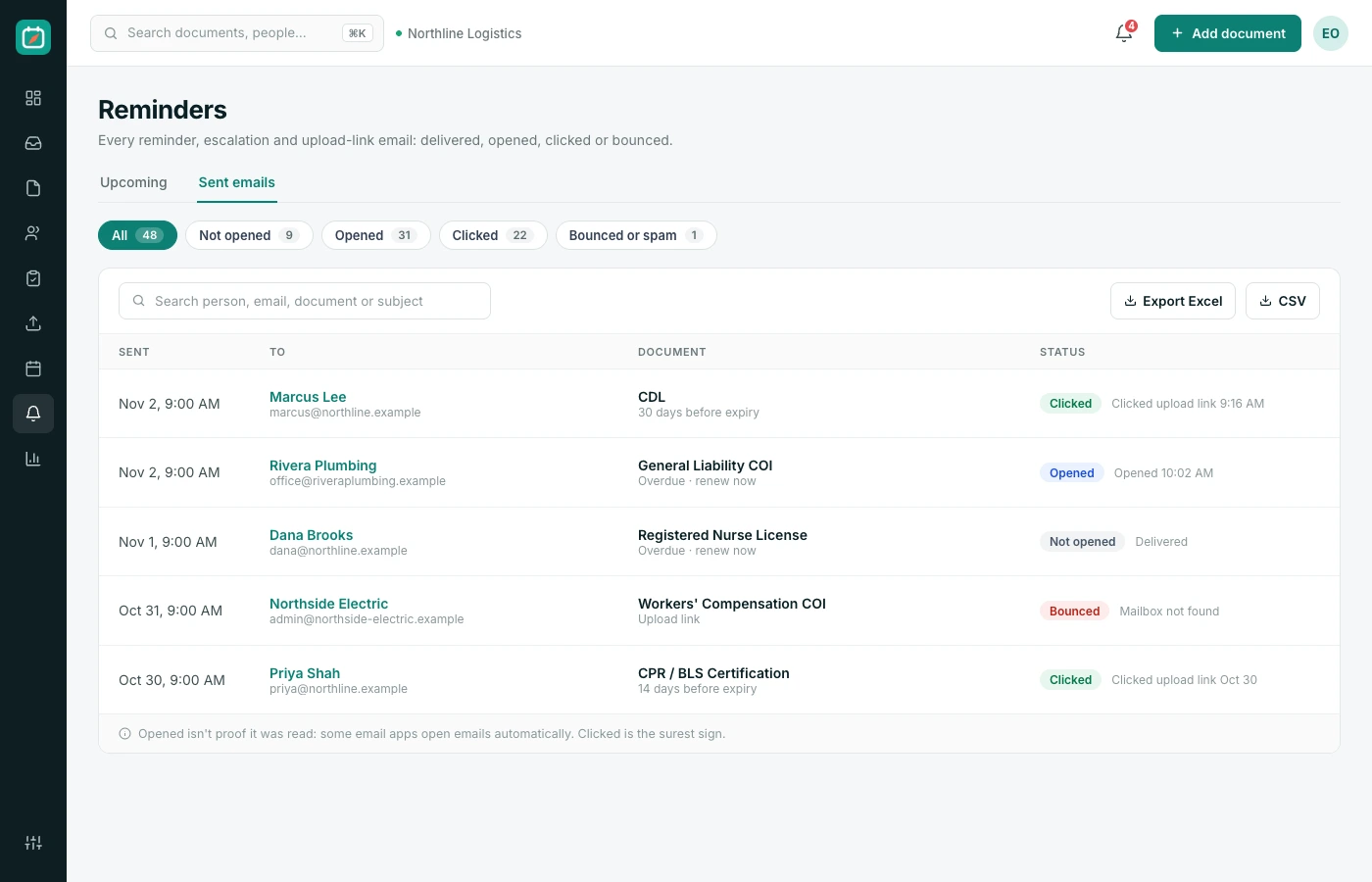
Each reminder in the log shows its recipient, its subject and its status.
| Status | What it means |
|---|---|
| Delivered | It reached the recipient’s mail server |
| Opened | The recipient opened the email |
| Clicked | They clicked a link, such as upload or done |
| Bounced | The address doesn’t work; fix it on the contact |
| Unsubscribed | An outside contact asked to stop |
02Deliverability
Bad addresses are caught before they cost you a renewal
A reminder sent to a wrong address is worse than none, because everyone assumes it worked.
When an email bounces, ExpirePilot flags the contact so you can fix the address, and stops sending to it. Addresses that report reminders as spam are skipped too, which keeps your reminders, and everyone else’s, landing in inboxes.
Built-in protection
- Bounced addresses are flagged on the contact
- Addresses that mark reminders as spam are skipped
- Outside contacts get an unsubscribe link
- Reminders are sent from a verified domain
- Daily sending limits protect every customer’s delivery
03Audit trail
A dated record of who was reminded, and when
When someone says “nobody told me”, the reminder log answers.
Every reminder and escalation is recorded with the item, the recipient and the result. Run the reminder activity report for any period, filter it by person or vendor, and export it for an auditor, a client or your own records.
The reminder activity report shows
- Every reminder sent, with date and time
- Who it went to and which item it was about
- Whether it was delivered and opened
- Escalations to managers, Owners and Admins
- Export to Excel, CSV or PDF
vsComparison
Send-and-forget reminders vs tracked reminders
The difference shows up the day something expires.
| Capability | Untracked email | ExpirePilot |
|---|---|---|
| Know it was delivered | No | Yes |
| Know it was opened | No | Yes |
| Know a link was clicked | No | Yes |
| Bad addresses caught | When someone notices | Flagged automatically |
| Proof of who was reminded | Search your sent mail | Reminder log and report |
| Respects unsubscribes | Manual | Built in |
◎Use cases
How teams use email tracking
Turn reminder data into the right next step.
Follow-up
Call the people who haven’t opened it
A week before a deadline, check who hasn’t opened their reminder and pick up the phone.
Clean data
Fix wrong addresses early
Bounces show up on the contact the day they happen, not when the document expires.
Audits
Prove reminders were sent
Export the reminder activity report to show an auditor or client that people were warned in time.
Disputes
Settle “nobody told me”
Show the date, time and status of every reminder a vendor or employee received.
+More features
Everything else ExpirePilot does for you
All in one simple tool, with a free plan to try it.
✦ Feature
AI document scanning
Snap a photo or upload a PDF. AI fills in the dates and details for you to check.
◷ Feature
Automated expiration reminders
90, 60, 30 and 7-day reminders, or your own schedule, that stop once it’s renewed.
↑ Feature
No-login upload links
People send renewed documents from their phone. No account, no password.
↗ Feature
Reminder escalation
Managers, then Owners and Admins, hear about anything nobody renews.
✓ Feature
Required documents by role
Set what each role needs and see who’s missing what.
▤ Feature
Reports and audit packets
Excel, CSV and PDF reports, plus a one-click audit packet.
$Pricing
Free plan and pricing
You can start for free. ExpirePilot’s free plan covers up to 20 tracked items with unlimited email reminders, unlimited people and 10 AI scans a month. No credit card, no time limit.
Paid plans start at $15 a month. Every new account also gets a 14-day free trial with Business-level features, so you can load everything you track before deciding.
Free plan includes
- Up to 20 tracked items
- 1 editing user, plus unlimited view-only users
- Unlimited email reminders
- 10 AI scans a month
- Free forever. Nothing is deleted if you stay on it.
Basic
For one person keeping a business compliant.
or $165 a year (1 month free)
- 250 tracked items
- 1 user who can edit
- 50 AI scans / month
- 2 GB file storage
or try it free for 14 days
Professional
For small teams sharing renewals and compliance.
or $429 a year (1 month free)
- 800 tracked items
- 3 users who can edit
- 200 AI scans / month
- 10 GB file storage
or try it free for 14 days
Most popular
Business
For growing teams tracking many people and vendors.
or $869 a year (1 month free)
- 2,000 tracked items
- 6 users who can edit
- 500 AI scans / month
- 25 GB file storage
or try it free for 14 days
Enterprise
For larger companies and multiple departments.
or $1,749 a year (1 month free)
- 5,000 tracked items
- 15 users who can edit
- 1,500 AI scans / month
- 50 GB file storage
or try it free for 14 days
Pay yearly and get one month free. Each document, license, certificate or contract counts as one tracked item, and people are unlimited. View-only users are free and unlimited on every plan, so managers can check on things at no extra cost. Our prices are public: no sales call or quote needed.
14 days free · No credit card required · Drops to the free plan, not a bill
Start free, and pay only when your list outgrows it.
Yes. Each reminder shows whether it was delivered and opened, and whether a link in it was clicked.
Open tracking is a strong signal but not perfect. Some email apps load images automatically or block them, so an email can show as opened when it wasn’t read, or the reverse. Clicks on the upload or done buttons are the most reliable sign of action.
The contact is flagged so you can correct the address, and ExpirePilot stops sending to the broken address.
Yes. Reminder emails to outside contacts include an unsubscribe link, and the contact is then shown as unsubscribed.
Yes. The reminder activity report lists every reminder sent and can be exported as Excel, CSV or PDF.
Yes. Delivery and open tracking are part of every reminder, on every plan.
Know that every reminder landed
See who opened their reminder, fix bad addresses early and keep a record of every reminder you’ve sent.
No credit card required. Free plan available.