Training tracking software
Training Tracking Software
Employee training tracking for training done anywhere: in a classroom, with an outside provider or in any LMS. Keep every employee’s safety training, refresher courses and training certificates current. ExpirePilot tracks who has completed what, reminds people before training expires, shows who’s missing required training for their role, and keeps the certificates ready for your next audit. More than a spreadsheet, without the setup of an LMS.
Free plan available. 14-day free trial, no credit card required.
Refresher reminders at 90/60/30/7 daysRequired training by roleAI reads the certificate
iDefinition
What is training tracking software?
Training tracking software, also called an employee training tracker, training records software or training management software, keeps a record of the training each employee has completed, with the completion date, the certificate and the date the training expires or a refresher is due. It reminds the right people before training lapses, shows who is missing required training, and produces training records for audits. It covers new-hire onboarding training, recurring refreshers and the qualifications each role needs, wherever the training happens. ExpirePilot does this for small and mid-sized teams that have outgrown a spreadsheet. It isn’t a learning management system (LMS): it doesn’t host courses, quizzes or e-learning content.
!The problem
Training records go out of date the day after the class.
Forklift evaluations, first aid, CPR, HAZWOPER refreshers, food handler cards, annual compliance training: each has its own cycle, and each employee is on a different date.
The completion certificate ends up in someone’s inbox, the refresher date sits in a spreadsheet column nobody checks, and you find out a certification lapsed when an inspector, auditor or client asks for proof. New hires and role changes add more training to track every month.
A spreadsheet can store a training date. It can’t remind anyone, chase a missing certificate or show who isn’t qualified for their role. ExpirePilot does all three automatically.
You’ve outgrown your training spreadsheet if:
- Different roles need different training
- Refreshers are due every year, every two years or every three, depending on the course
- Supervisors keep their own lists of who’s trained on what
- You’ve found expired training during an audit, an inspection or a client review
- Training certificates live in email, paper files and shared drives
vsComparison
Training tracking spreadsheet vs training tracking software
A spreadsheet stores training dates. Training tracking software acts on them.
| Capability | Spreadsheet | ExpirePilot |
|---|---|---|
| Reminds people before training expires | No | 90, 60, 30 and 7 days, or your own schedule |
| Shows who’s missing required training for their role | Cross-checked by hand | Live “who’s missing what” view |
| Tells a manager when a refresher is ignored | No | Automatic escalation |
| Collects new certificates from employees | You chase by email | No-login upload link, you approve |
| Reads dates off the certificate | Typed by hand | AI scan, you confirm |
| Keeps the certificate and past completions | Separate folders | Stored with the record, with history |
| Produces training records for an audit | Rebuilt each time | Reports and audit packet in a few clicks |
| Cost | Free, plus admin time | Free plan, paid from $15/month |
01Training expiration reminders
Track every training course, refresher and certificate in one place
Add each completed training with the employee, the completion date and the date it expires or a refresher is due, and ExpirePilot watches the dates. The employee and their supervisor get an email 90, 60, 30 and 7 days before training expires. Keep the standard schedule, or build your own in days, weeks or months and use it for any training type.
Instructor-led classes, on-the-job training sign-offs, e-learning completions from your LMS and courses with outside providers all go in the same way, as one-time or recurring training.
Each training type can have its own renewal cycle, so when you mark training as renewed, the next due date fills in for you. Reminder emails can go out in English or Spanish, and you can see whether each one was delivered and opened.
OSHA 10 and OSHA 30Forklift and powered industrial trucksCPR, AED and first aidBLS and ACLSHAZWOPER refreshersBloodborne pathogensFall protectionAerial and scissor liftRespirator trainingConfined spaceLockout/tagoutDOT hazmat employee trainingFood handler and food managerHIPAA trainingHarassment preventionDefensive drivingCustom training types
Reminder sequence · 90 / 60 / 30 / 7 days before
↗Escalation
If nobody renews it, their manager hears about it
If training still isn’t renewed, ExpirePilot tells the employee’s manager before the deadline, then your Owners and Admins the day after it lapses, and keeps following up until it’s handled. Everything stops once the new completion is on file.
| When | Who is notified | How |
|---|---|---|
| 90, 60, 30 and 7 days before | The employee and the people you choose | |
| Before the deadline (you choose when) | The employee’s manager | |
| The day after it expires | Your company’s Owners and Admins | |
| After expiry, every few days (you choose) | The usual reminder recipients, until it’s renewed |
Reminders go by email on every plan, including Free. Recipients can also snooze a reminder or hand it to a teammate from the email.
Stop checking the training log. ExpirePilot checks it for you.
02Training matrix
Set required training by role and see who’s missing what
Tell ExpirePilot which training each role needs, like “forklift operators need a forklift evaluation, first aid and hazard communication” or “drivers need defensive driving and a DOT medical card.” Everyone with that role picks up the requirements automatically.
The “who’s missing what” view works as a live training matrix: for every person, each required training shows as current, expiring soon, expired or missing. Mark training as not needed for someone, and request missing certificates in one click: each person gets an upload link for what’s missing.
People and roles are unlimited on every plan. Rules can also apply to contractors, vehicles, equipment and locations.
Know who’s trained and cleared for the job before the shift starts.
◉Training compliance dashboard
A training compliance dashboard that says who needs what, today
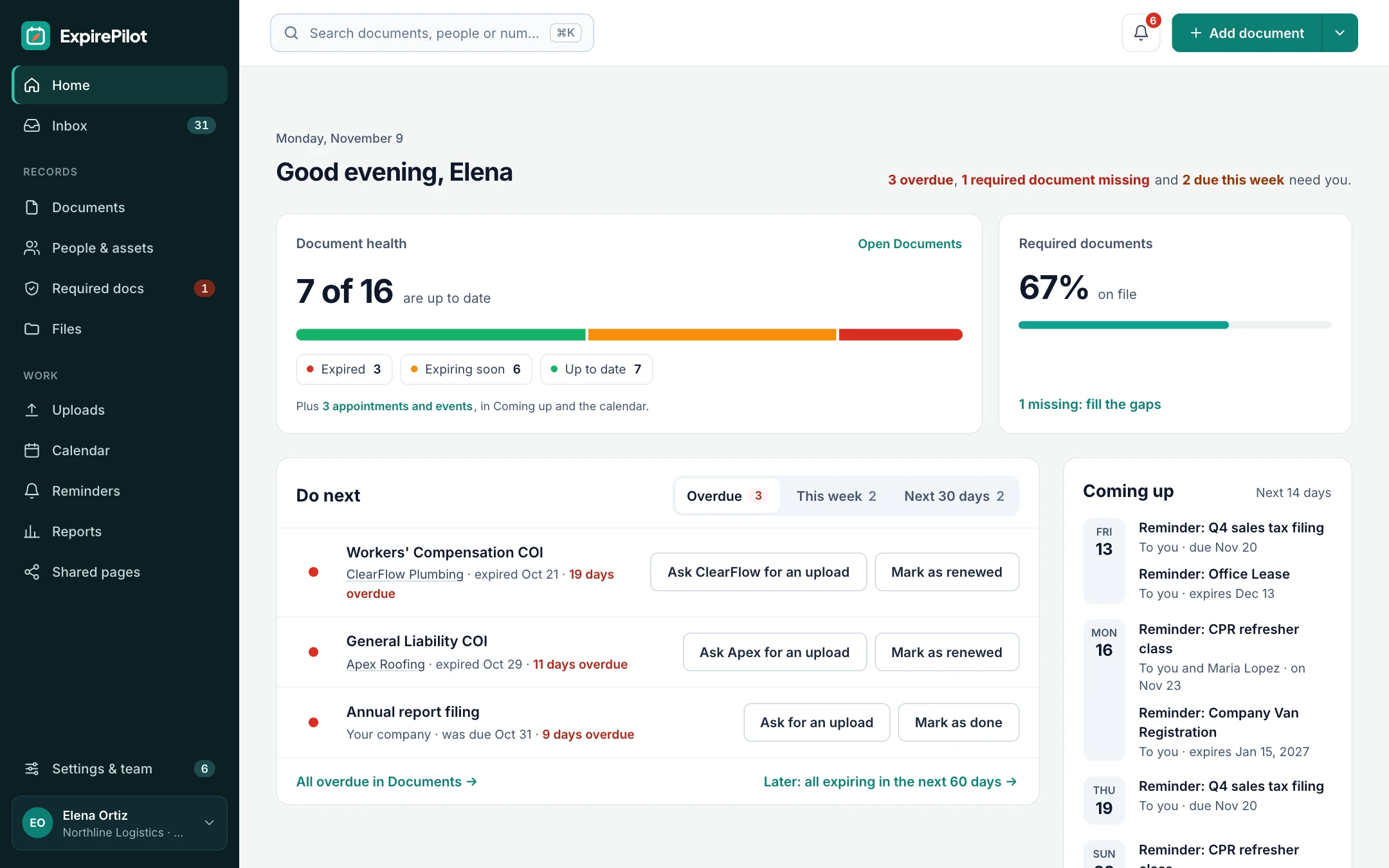
Open ExpirePilot and the dashboard answers one question first: is anyone’s training out of date? It shows a count of what needs someone now, each item one click away, and what’s next to expire.
It also shows what share of required training is covered across your company, so you can see at a glance how close you are to fully trained.
The numbers worth watching: required training covered, expired or overdue, missing, and expiring in the next 30, 60 or 90 days, all one click away on the dashboard and in Reports.
- Training with an expiry: valid, expiring (within 60 days), expired or on hold
- Training deadlines: on track, due soon or overdue
- Required training: covered or missing, per person
- Tag records with a site, department or shift, filter by it and save the view
Needs someone now
✚Onboarding training
Track new-hire onboarding training from day one
Add a new hire with their role, and the training that role needs shows up for them right away as missing. Click “Request missing certificates” and they get an upload link for anything they already hold.
For onboarding training they still have to complete, add a deadline such as “harassment prevention within 30 days of hire” as a due date. It gets its own reminders, shows as due soon or overdue, and escalates to their manager if it slips. Onboarding courses that never expire stay on file with their certificate.
- Required training by role, applied the moment someone is added
- Onboarding deadlines with reminders and escalation
- Import new hires from your HR system’s export
- Archive leavers: reminders stop, records stay for audits
03Training sessions & crews
Plan refresher sessions on a training calendar, cover a whole crew and keep the history
Not every training date is an expiry. Add an upcoming class as an appointment with its date, time and room, or an annual training deadline as a due date, each with its own reminders.
When one class certifies a whole crew, record it once and link it to everyone it covers, so a single certificate counts for twelve people. When someone completes a refresher, mark it as renewed: the new dates take over and the previous completion, certificate and dates stay in the history. Put an employee on leave on hold, and their reminders pause without counting as expired.
- Training sessions with date, time and location
- Annual training deadlines as due dates
- One certificate covering several people
- Every past completion kept in the history
04No-login uploads
Employees upload their own training certificates
When someone’s training is about to expire, their reminder includes a secure upload link. After the class, they send the new certificate as a PDF or a phone photo, and it lands in your review queue. No app, password or account needed, so it works for frontline staff and contractors too.
The upload page and reminder emails can be in English or Spanish. Reminder emails also have one-click buttons, so a recipient can mark training done or upload a file straight from their inbox. Nothing changes until you approve it.
- They get the linkEach reminder includes a personal upload link.
- They upload the certificateA PDF or a photo from their phone.
- You approve itCheck it, approve it, and the new date takes over.
Training certificates come to you, not the other way around.
05AI scanning
AI reads the training certificate for you
Upload a training certificate or wallet card and ExpirePilot reads it. It pulls out who it belongs to, the training type, the certificate number and the dates, then fills in the record. You check it and click confirm.
It works on PDFs, scans and phone photos. Scan up to 25 certificates at once, or import the training spreadsheet you already have from Excel or CSV, along with your list of employees.
What it extracts
Who it belongs toTraining typeTitleCertificate or card numberCompletion or issue dateExpiry date
Load years of training records in an afternoon, not a week.
06Training records & audits
Show an auditor or inspector training records in minutes
ExpirePilot is your training register: every employee’s training, the dates, the certificate and the reminder history in one place, so you can pull up exactly what’s asked for.
Need everything for one person, one crew or the whole company? Download an audit packet: a summary PDF plus every certificate file, in a folder per person.
The reminder log is your audit trail. It records every reminder sent, to whom, when, and whether it was delivered and opened, so you can show you followed up. A weekly summary email keeps supervisors informed without opening the app.
The evidence is verifiable: every certificate sent through an upload link records who sent it and when, nothing changes until someone on your team approves it, and every renewal keeps the previous completion and certificate in the history.
- Training records by employee, team or training type
- Expiring and expired training, flagged clearly
- Reminder activity: who was reminded, when and whether they opened it
- Export as PDF, Excel or CSV
⏱Reference
Common workplace training and how often it’s refreshed
A quick reference for setting up reminders. Requirements vary by regulator, state, certifying body and employer policy, so always go by the dates on the certificate and the rules that apply to you. In OSHA’s preliminary list of most-cited standards for fiscal year 2026, respiratory protection (1910.134), powered industrial trucks (1910.178) and fall protection training (1926.503) all made the top 10.
| Training | Typical refresher cycle | Who usually needs it | Suggested first reminder |
|---|---|---|---|
| Forklift operator evaluation | At least every 3 years, and after an incident or unsafe operation (29 CFR 1910.178(l)(4)) | Warehouse, manufacturing, retail | 60–90 days before |
| CPR, AED and first aid | Usually every 2 years | Designated responders, childcare, fitness, healthcare | 60 days before |
| BLS and ACLS | Usually every 2 years | Nurses, clinicians, EMTs | 60–90 days before |
| HAZWOPER | 8-hour refresher every year (29 CFR 1910.120(e)(8)) | Hazardous waste and cleanup workers | 60 days before |
| Bloodborne pathogens | Every year (29 CFR 1910.1030(g)(2)) | Healthcare, janitorial, tattoo, first responders | 30–60 days before |
| Respirator training and fit test | Every year (29 CFR 1910.134(k) and (f)) | Anyone required to wear a respirator | 30–60 days before |
| DOT hazmat employee training | At least every 3 years (49 CFR 172.704(c)(2)) | Shippers, drivers and warehouse staff who handle hazmat | 90 days before |
| OSHA 10 and OSHA 30 cards | No federal expiry; some states, sites and clients require a refresh, often every 5 years | Construction and general industry | 90 days before, if it applies |
| Food handler card | Often every 2–5 years, by state or county | Restaurant and food service staff | 30–60 days before |
| Food protection manager certification | Usually every 5 years | Restaurant managers | 90 days before |
| Harassment prevention training | Every 1–2 years in some states (for example New York and California) | Employees and supervisors | 60 days before |
| HIPAA training | Commonly every year, by policy | Healthcare staff and business associates | 30–60 days before |
ExpirePilot isn’t limited to these. It tracks any training, course or certificate with a date, in the US or elsewhere.
What auditors ask a training record to show
Inspectors don’t just ask whether training happened. Some standards spell out what the record must show.
| Training | What the record must show | Where it goes in ExpirePilot |
|---|---|---|
| Forklift operator (29 CFR 1910.178(l)(6)) | Operator’s name, training date, evaluation date, and who trained and evaluated them | The signed evaluation as the file, dates on the record, trainer and evaluator on the certificate or in notes |
| Bloodborne pathogens (29 CFR 1910.1030(h)(2)) | Training dates, a summary of the content, trainers’ names and qualifications, attendees’ names and job titles | One record linked to everyone in the session, with the sign-in sheet or certificate attached |
| DOT hazmat (49 CFR 172.704(d)) | Employee’s name, most recent completion date, the training materials, the trainer’s name and address, and a certification | Record per employee with the certificate attached; materials and trainer in notes or as files |
| HAZWOPER (29 CFR 1910.120(e)(6)) | A written certificate of completion | The certificate as the file, with the annual refresher date |
| HIPAA (45 CFR 164.530(b) and (j)) | Proof that training was provided | Record with completion date and certificate or sign-off file |
ExpirePilot doesn’t have separate trainer or evaluator fields: keep them on the attached certificate or in the record’s notes.
How long to keep training records
Some standards set how long training records must be kept. A few common examples:
| Record | How long to keep it | Rule |
|---|---|---|
| Bloodborne pathogens training | 3 years from the training date | 29 CFR 1910.1030(h)(2) |
| DOT hazmat employee training | The preceding 3 years, and 90 days after the employee leaves | 49 CFR 172.704(d) |
| Respirator fit test | Until the next fit test | 29 CFR 1910.134(m)(2) |
| Forklift training and evaluation | Keep the current certification on file | 29 CFR 1910.178(l)(6) |
| HIPAA training documentation | 6 years | 45 CFR 164.530(j) |
In ExpirePilot, renewing a training keeps the previous completion and certificate in its history, and archiving an employee who leaves stops their reminders but keeps their records for audits. State, client and employer rules may ask for longer.
?Which option do you need?
Training tracker vs LMS vs HR software vs spreadsheet
“Training tracking software” can mean very different tools. Pick the one that matches the job you need done.
| Training tracker (ExpirePilot) | Learning management system (LMS) | HR software (HRIS) | Spreadsheet | |
|---|---|---|---|---|
| The job it does | Keeps training and certificates from lapsing, and shows who’s missing what | Delivers courses, quizzes and e-learning, and records completions | Runs payroll, time off and employee records | Stores dates |
| Training delivery | No, training happens wherever you run it today | Yes | Sometimes, as an add-on | No |
| Reminders before training expires | Yes, with escalation to managers | Varies, often course-focused | Varies | No |
| Required training by role | Yes, with a live gap view | Usually, as course assignments | Varies | By hand |
| Training done outside the company (CPR class, forklift evaluation, college course) | Yes, with the certificate on file | Often entered by hand, if supported | Varies | Yes, by hand |
| Pricing | Public: free plan, paid from $15/month | Often per user, sometimes quoted | Usually per employee | Free |
| Setup | Same day | Weeks, plus building or buying courses | An HR rollout | Minutes |
Many teams run training in an LMS or with outside trainers, then use ExpirePilot to make sure nobody’s certification lapses.
+Benefits
Benefits of training tracking software
What changes when training dates stop living in a spreadsheet.
- Fewer lapses. Reminders go out before training expires, and escalate to managers when nobody acts.
- Audit readiness. Training records, certificates and the reminder log are ready to export when an inspector, auditor or client asks.
- Time saved. AI reads certificates, employees upload their own, and nobody chases renewals by hand.
- Clear accountability. Each record has a person responsible and a manager who hears about it if it slips.
- Workforce readiness. The training matrix shows who is qualified for their role before they start a shift or reach a site.
✓Buyer’s checklist
How to choose training tracking software
Eight things to check before you pick a tool, and how ExpirePilot handles each one.
| What to check | Why it matters | ExpirePilot |
|---|---|---|
| Expiry and refresher automation | Training lapses quietly unless someone is reminded in time | Reminders at 90/60/30/7 days or your own schedule; next due date fills in on renewal |
| Required training by role | Different jobs need different training | Rules by role, with a live “who’s missing what” matrix |
| Escalation | Reminders get ignored | Manager before the deadline, Owners and Admins after, repeat follow-ups |
| Collecting certificates | Proof matters as much as the date | No-login upload link, AI scanning, your approval before anything changes |
| Reporting and audits | You’ll be asked to prove it | Reports in PDF, Excel and CSV; audit packet with every certificate |
| Training done anywhere | Classes happen in-house, with outside providers and in LMSs | Tracks any course or certificate with a date, including whole-crew certificates |
| Frontline-friendly | Many workers don’t sit at a desk or read English first | Phone-friendly uploads; reminder emails and upload pages in English or Spanish |
| Pricing model and setup | Per-user pricing grows with every hire | Public prices by tracked item, unlimited people, free plan; same-day setup |
Example: a 50-person crew with four tracked trainings each is 200 records. That fits the Basic plan at $15 a month, with no charge per employee.
◎Industries
Employee training tracking for safety, healthcare and frontline teams
Built for teams tracking training for a dozen to a few thousand people, without an enterprise rollout.
Construction and trades
Crews trained before they reach the site
A contractor tracks OSHA cards, fall protection, aerial lift and confined space training per worker, plus subcontractors’ training. Reminders and upload pages can be in Spanish.
Warehousing and manufacturing
Forklift and safety training on schedule
A warehouse sets required training for each role, sees who’s missing a forklift evaluation or lockout/tagout training, and plans refresher sessions as calendar appointments.
Healthcare and home care
No lapsed BLS mid-shift
A clinic or home care agency tracks BLS, ACLS, bloodborne pathogens and annual HIPAA training next to each nurse’s or caregiver’s license, with the certificates ready for a survey. Course certificates for CEUs can sit next to the license they renew.
Restaurants and food service
Food handler cards for every location
A restaurant group tracks food handler and food manager certifications per store. Store managers get free view-only access, and head office hears when one is ignored.
Professional licenses and certifications can live in the same account. See certification tracking →
→Getting started
Up and running the same day
No sales call, no implementation project.
Step 1 · About 10 minutes
Add your people
Import your employee list from a spreadsheet, with their roles, or add people one by one.
Step 2 · About 15 minutes
Set required training
Pick the training each role needs. ExpirePilot suggests training types for your industry to start from.
Step 3 · Automatic
Bring in records and relax
Import your training spreadsheet or scan certificates with AI. Reminders and escalations then run on schedule.
Moving from a training spreadsheet: a 6-step checklist
- Clean the spreadsheetOne row per person per training, real dates, no duplicates, leavers removed.
- Map roles to trainingList your roles and the training each one needs.
- Import people, then trainingBring in your employee list with roles, then your training records.
- Scan what’s missingUse AI scanning for certificates whose dates aren’t in the spreadsheet.
- Give everyone a managerSet a manager or responsible teammate, so escalations reach someone.
- Review every quarterCheck required training as roles, sites and rules change.
Small teams are usually set up the same day. Larger teams with years of paper certificates take longer, mostly in step 4.
⇄Integrations
Works next to the tools you have
ExpirePilot works alongside your HR system and LMS through spreadsheet imports and an API. There’s no built-in HRIS or LMS sync yet; most teams bring data in like this:
- Export a completions report from your LMS (TalentLMS, iSpring and others) or an employee list from your HR system (BambooHR, Gusto, ADP, Workday, Rippling and others), then import the Excel or CSV file
- A REST API with webhooks on Professional plans and up, to add people and training records from your own systems and send changes back out
- Scan training certificates and cards with AI
- A private calendar link for Google Calendar, Outlook and Apple Calendar
- Post reminder summaries to a Slack or Microsoft Teams channel
- Export any report as Excel, CSV or PDF, or download everything at once
✓Security
Your training records stay private
- Each company’s records and files are kept separate
- Files are stored encrypted on Amazon Web Services and open only through short-lived secure links
- Automatic backups cover the last 35 days
- Owner, Admin, Member and Viewer roles control who sees and changes what
- Two-step verification for your account
- Close your account and its records and files are deleted; backups are erased within 35 days
- Export everything any time. No lock-in.
We aren’t SOC 2 audited yet. If your organization needs a SOC 2 report, contact us before you sign up.
@How reminders reach people
Email, calendar and a weekly summary
- Reminder emails, in English or Spanish, with delivery and open tracking
- Training dates and sessions in Google Calendar, Outlook or Apple Calendar through a private calendar link
- A weekly summary email of what’s coming up
- Escalation emails to managers, Owners and Admins
Text message reminders aren’t available yet. Today every reminder goes by email.
▢On the phone
Works in the browser on any phone
- Check someone’s training from the floor or the site, in your phone’s browser
- Photograph a certificate or wallet card and let AI fill in the details
- Employees upload new certificates from their phone, without an account
- Recipients can mark training done or upload a file from the reminder email
There’s no app to install from the App Store or Google Play.
$Pricing
Free plan and pricing
You can track training for free. ExpirePilot’s free plan covers up to 20 training records with unlimited email reminders, unlimited people and AI scanning, which is enough for a small crew or to try it out properly. No credit card, no time limit.
When you need more, paid plans start at $15 a month. Every new account also gets a 14-day free trial with Business-level features, so you can load your whole team’s training before deciding.
Free plan includes
- Up to 20 training records
- 1 editing user, plus unlimited view-only users
- Unlimited email reminders
- 10 AI certificate scans a month
- Free forever. Nothing is deleted if you stay on it.
Basic
For one person keeping a business compliant.
or $165 a year (1 month free)
- 250 tracked items
- 1 user who can edit
- 50 AI scans / month
- 2 GB file storage
or try it free for 14 days
Professional
For small teams sharing renewals and compliance.
or $429 a year (1 month free)
- 800 tracked items
- 3 users who can edit
- 200 AI scans / month
- 10 GB file storage
or try it free for 14 days
Most popular
Business
For growing teams tracking many people and vendors.
or $869 a year (1 month free)
- 2,000 tracked items
- 6 users who can edit
- 500 AI scans / month
- 25 GB file storage
or try it free for 14 days
Enterprise
For larger companies and multiple departments.
or $1,749 a year (1 month free)
- 5,000 tracked items
- 15 users who can edit
- 1,500 AI scans / month
- 50 GB file storage
or try it free for 14 days
Pay yearly and get one month free. Each training record counts as one tracked item, and people are unlimited. View-only users are free and unlimited on every plan, so supervisors can check their team’s training at no extra cost. Our prices are public: no sales call or quote needed.
14 days free · No credit card required · Drops to the free plan, not a bill
Start free, and pay only when your training log outgrows it.
Training tracking software keeps a record of the training each employee has completed, with completion and expiry dates and a copy of each certificate. It reminds people before training expires, shows who is missing required training for their role, and produces training records for audits. ExpirePilot is training tracking software for small and mid-sized teams.
It depends on the job. If you need to build and deliver courses, you need a learning management system (LMS). If you need the training your people already do to stay current and provable, look for:
- Automatic reminders before training expires, on a schedule you can change
- Required training by role, with a view of who’s missing what
- Escalation to a manager when a reminder is ignored
- A simple way for employees to send in new certificates
- Reports and an audit packet you can hand to an auditor
- Public, predictable pricing, ideally with a free plan to try it
ExpirePilot does all six, with a free plan for up to 20 items and paid plans from $15 a month. See the full checklist in How to choose training tracking software.
Keep one list with every employee, each training they’ve completed, the completion date, the expiry or refresher date and a copy of the certificate. Decide which training each role needs, and set reminders 30 to 90 days before each date for the employee and their supervisor. In ExpirePilot, you import your employees and training spreadsheet or scan certificates with AI, set required training by role, and reminders go out automatically.
Yes. ExpirePilot has a free plan that covers up to 20 training records, unlimited email reminders and 10 AI scans a month, with no time limit and no credit card. New accounts also get a 14-day free trial with Business features. Paid plans start at $15 a month for 250 tracked items.
LMS platforms are often priced per user and sometimes quoted. ExpirePilot’s prices are public: $0 on the free plan, then $15, $39, $79 or $159 a month for 250 to 5,000 tracked items, with one month free on yearly billing. People and view-only users are unlimited on every plan.
No. ExpirePilot doesn’t host courses, quizzes or e-learning. It tracks the training your people complete anywhere, whether in your LMS, with an outside trainer or in a classroom, and makes sure it doesn’t lapse. It doesn’t play SCORM or xAPI courses or record quiz scores. To bring LMS completions in, export a completions report as CSV and import it, or send them through the API. Many teams use both.
Yes. Set the training each role needs, and the “who’s missing what” view shows, for every person, whether each required training is current, expiring soon, expired or missing. You can mark training as not needed for someone and request missing certificates by email in one click.
Yes. You can store one-time training, such as an onboarding course, as a record with its certificate. For training that needs a refresher, add the refresher date and reminders start automatically.
Yes. Add a class as an appointment with its date, time and location, or an annual training deadline as a due date. Each gets its own reminders and shows in Google Calendar, Outlook or Apple Calendar through a private calendar link. ExpirePilot doesn’t handle class sign-ups or attendance sheets.
Yes. Record the training once and link it to everyone it covers, so a single certificate counts for each person in the crew.
Yes. Their reminder includes a secure upload link. They attach the new certificate as a PDF or photo from a phone or computer, without an account, in English or Spanish. It goes to your review queue, and the record only changes once you approve it.
Yes. Upload an Excel or CSV file, match your columns to ExpirePilot’s fields and import. You can import your list of employees the same way, and export everything back to a spreadsheet at any time.
Add the new hire with their role, and the training that role needs appears for them as missing. Request missing certificates by email in one click, and add onboarding deadlines, such as a course due within 30 days of hire, as due dates with their own reminders and escalation to the manager.
Yes. The dashboard shows how many things need someone now, lists each one, and shows the share of required training that’s covered. Training shows as valid, expiring, expired or on hold, and training deadlines as on track, due soon or overdue.
Yes. Tag records with a site, department or shift, filter the list by it and save the view. Reports also group training by person and by training type, and export as PDF, Excel or CSV.
You can record each course with its certificate, dates and a note of the hours or credits. ExpirePilot doesn’t add up hours or CEU totals. For a license renewed with CEUs, track the license’s expiry and keep each course certificate on file.
No. It doesn’t run assessments or practical sign-offs. When a sign-off produces a record, such as a forklift operator evaluation, store it as training with its file and renewal date, and ExpirePilot reminds people before it’s due again.
Yes. A REST API is included on the Professional plan and up, and during the free trial. Use it to add people and training records from your own systems.
There’s no built-in sync with an HRIS yet. Export your employee list from BambooHR, Gusto, ADP, Workday, Rippling or another HR system as Excel or CSV and import it, with roles. On the Professional plan and up, the REST API and webhooks can keep people and training records in step with your own systems.
Any training with a date: instructor-led classes, on-the-job training sign-offs, e-learning completions exported from an LMS, outside courses, onboarding and one-time training, and recurring refreshers, each with its certificate.
Start with four: the share of required training covered, how many trainings are expired or overdue, how many people are missing required training, and what expires in the next 30, 60 or 90 days. ExpirePilot shows these on the dashboard, the required training page and the Expiring soon report.
For tracking, yes: it keeps training records, certificates, required training by role, reminders and audit reports. It doesn’t deliver courses, run quizzes, take attendance or handle class sign-ups, so if you need those, use it next to an LMS.
Yes, for what auditors usually ask about. The reminder log records every reminder sent, to whom, when, and whether it was delivered and opened. Uploads record who sent each certificate, when, and when it was reviewed. Renewals keep every previous completion and certificate in the history. ExpirePilot doesn’t log every individual field edit.
Not yet. Reminders go by email on every plan, in English or Spanish, and you can also see training dates in Google Calendar, Outlook or Apple Calendar through a private calendar link.
There’s no app to install, but ExpirePilot works in the browser on any phone. You can check someone’s training, photograph a certificate for AI scanning, and approve uploads from your phone. Employees upload new certificates from their phone without an account.
Each company’s records and files are kept separate, files are stored encrypted on Amazon Web Services and open only through short-lived secure links, and automatic backups cover the last 35 days. Roles control who can see and change what, two-step verification protects your account, and you can export everything at any time. Closing your account deletes your records and files, and backups are erased within 35 days. ExpirePilot isn’t SOC 2 audited yet.
Never find expired training at an audit again
Let ExpirePilot remind the right people, show who’s missing required training and keep every certificate ready to show.
No credit card required. Free plan available.