Required documents
Required Documents by Role
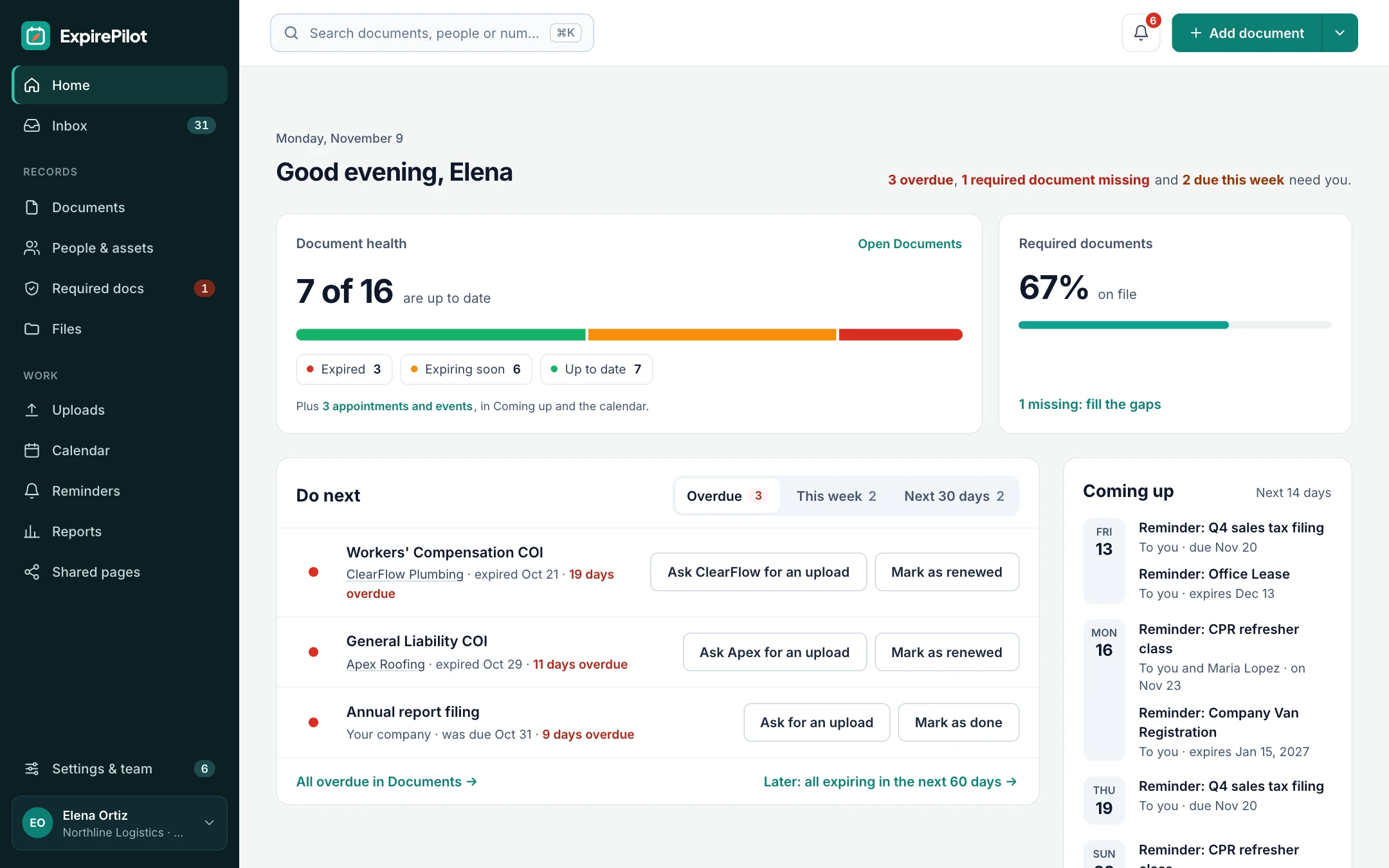
Know who’s missing what. Tell ExpirePilot which documents each role needs, like a CDL and medical card for every driver or general liability and workers’ comp for every subcontractor. You see straight away who is fully covered, what’s expiring and what was never sent, and you can request it in one click.
Free plan available. 14-day free trial, no credit card required.
Requirements by roleWho’s missing what, at a glanceRequest missing documents in one click
iDefinition
What is required document tracking?
Required document tracking, sometimes called a compliance matrix, training matrix or credential matrix, lists the documents each type of person or vendor must have and checks everyone against it. Instead of tracking only the documents you happen to have, it also shows the ones that are missing. In ExpirePilot, you attach requirements to a role, give people and vendors that role, and every requirement shows as current, expiring soon, expired or missing.
!The problem
A tracker only reminds you about documents you already have.
The riskiest document is the one that never arrived: the new hire who never sent their license, or the subcontractor who never sent workers’ comp.
A spreadsheet of expiration dates can’t show what’s missing, because there’s no row for it. So gaps hide until a client audit, an inspection or an incident, and someone has to cross-check every person against a list by hand.
Set the rules once. ExpirePilot checks everyone against them, every day.
You need required documents if:
- Different roles need different licenses or certifications
- Each kind of vendor must send certain insurance certificates
- New hires and new vendors join every month
- Someone cross-checks people against a requirements list by hand
- An audit has found a document that was never collected
→How it works
From requirements to a complete file in three steps
Step 1
Set what each role needs
For example “Drivers need a CDL and a DOT medical card” or “Subcontractors need GL and workers’ comp.”
Step 2
Give people a role
Assign the role to each person or vendor, by hand or in a spreadsheet import. Their requirements come with it.
Step 3
Close the gaps
See who’s missing what and send upload requests to everyone who owes a document, in one go.
01Gap report
Who’s missing what, for every person and vendor
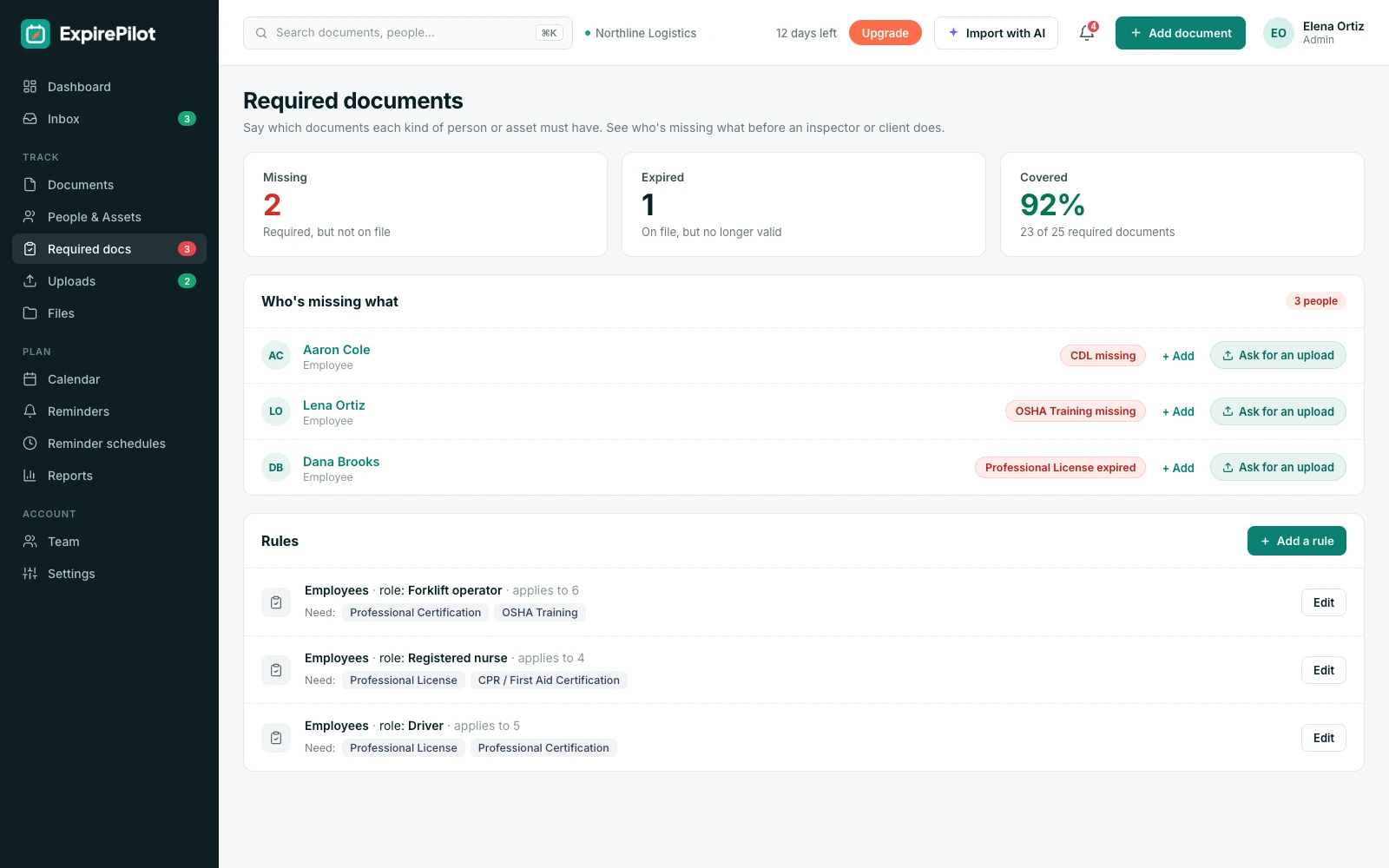
The “who’s missing what” view checks every person and vendor against their role.
| Status | Meaning |
|---|---|
| Current | On file and in date |
| Expiring soon | On file, inside its reminder window |
| Expired | On file, past its date |
| Missing | Required, but never sent |
| Not needed | Excused for this person |
Filter by role, person or status, and export the result for a client or auditor.
02Roles and exceptions
Rules that fit how your business really works
Give each role its own list of required documents, and every person or vendor with that role inherits it.
When a requirement doesn’t apply to someone, such as workers’ comp for a sole proprietor with no employees, mark it as not needed for them, so your gap report shows only real gaps. ExpirePilot can also suggest document types for your industry to start from.
Examples of requirements
| Role | Required documents |
|---|---|
| Driver | CDL, DOT medical card, defensive driving |
| Nurse | State RN license, BLS, TB test |
| Electrician | Journeyman license, OSHA 10 |
| Subcontractor | General liability COI, workers’ comp COI |
| Cleaning vendor | General liability COI |
03Request what’s missing
Turn the gap list into upload requests
Knowing what’s missing is only useful if collecting it is easy.
Request a missing document from one person in one click, or select everyone who owes something and send all the requests at once. As documents arrive and you approve them, the gap report updates on its own.
What happens next
- Each person gets their own secure upload link
- They send the document from a phone or computer, without logging in
- Uploads go to your review queue
- Approving fills the gap and starts reminders for the new date
- Unanswered requests keep getting reminders
vsComparison
Requirements checklist vs required documents in ExpirePilot
A checklist tells you what should be there. ExpirePilot tells you what isn’t.
| Capability | Checklist + spreadsheet | ExpirePilot |
|---|---|---|
| Shows documents never sent | Only if someone cross-checks | Automatically, as “missing” |
| Requirements by role | Written down somewhere | Attached to each role |
| Exceptions for individuals | Notes in a cell | Mark as not needed |
| Requests missing documents | Email each person | One click, or everyone at once |
| Updates as documents arrive | By hand | On approval |
| Report for a client or auditor | Rebuilt each time | Export any time |
◎Use cases
Who sets required documents
Any team where the rules depend on the role.
Fleets
Driver qualification files
Every driver needs a CDL, a medical card and more. See which drivers are fully qualified before dispatch.
Construction
Subcontractor compliance
Set the COIs and licenses each trade must have, and see which subs are cleared to work.
Healthcare
Staff credentials
Track licenses, BLS and health screenings by role, and catch gaps before a survey.
Property management
Vendors and tenants
Require insurance from every vendor and tenant, and see who hasn’t sent theirs.
+More features
Everything else ExpirePilot does for you
All in one simple tool, with a free plan to try it.
✦ Feature
AI document scanning
Snap a photo or upload a PDF. AI fills in the dates and details for you to check.
◷ Feature
Automated expiration reminders
90, 60, 30 and 7-day reminders, or your own schedule, that stop once it’s renewed.
↑ Feature
No-login upload links
People send renewed documents from their phone. No account, no password.
↗ Feature
Reminder escalation
Managers, then Owners and Admins, hear about anything nobody renews.
@ Feature
Reminder email tracking
See whether each reminder was delivered, opened and clicked.
▤ Feature
Reports and audit packets
Excel, CSV and PDF reports, plus a one-click audit packet.
$Pricing
Free plan and pricing
You can start for free. ExpirePilot’s free plan covers up to 20 tracked items with unlimited email reminders, unlimited people and 10 AI scans a month. No credit card, no time limit.
Paid plans start at $15 a month. Every new account also gets a 14-day free trial with Business-level features, so you can load everything you track before deciding.
Free plan includes
- Up to 20 tracked items
- 1 editing user, plus unlimited view-only users
- Unlimited email reminders
- 10 AI scans a month
- Free forever. Nothing is deleted if you stay on it.
Basic
For one person keeping a business compliant.
or $165 a year (1 month free)
- 250 tracked items
- 1 user who can edit
- 50 AI scans / month
- 2 GB file storage
or try it free for 14 days
Professional
For small teams sharing renewals and compliance.
or $429 a year (1 month free)
- 800 tracked items
- 3 users who can edit
- 200 AI scans / month
- 10 GB file storage
or try it free for 14 days
Most popular
Business
For growing teams tracking many people and vendors.
or $869 a year (1 month free)
- 2,000 tracked items
- 6 users who can edit
- 500 AI scans / month
- 25 GB file storage
or try it free for 14 days
Enterprise
For larger companies and multiple departments.
or $1,749 a year (1 month free)
- 5,000 tracked items
- 15 users who can edit
- 1,500 AI scans / month
- 50 GB file storage
or try it free for 14 days
Pay yearly and get one month free. Each document, license, certificate or contract counts as one tracked item, and people are unlimited. View-only users are free and unlimited on every plan, so managers can check on things at no extra cost. Our prices are public: no sales call or quote needed.
14 days free · No credit card required · Drops to the free plan, not a bill
Start free, and pay only when your list outgrows it.
A document a person or vendor must have because of their role, such as a CDL for a driver or a general liability certificate for a subcontractor. ExpirePilot checks everyone against the requirements of their role.
Mark it as not needed for that person or vendor. It no longer shows as missing in your reports.
Yes. Select everyone who is missing a document and send upload requests in one go. Each person gets their own link.
Yes. Requirements work the same way for employees, vendors, subcontractors and other contacts.
Yes. Export it as Excel, CSV or PDF for a client, an auditor or your own records.
It works like one. A training matrix is the same idea applied to training: which training each role needs, and who has it.
See every gap before an auditor does
Set what each role needs once. ExpirePilot shows who’s missing what and collects it for you.
No credit card required. Free plan available.