
9 Best Expiration Reminder Software Tools in 2026 (Compared)
ExpirePilot is the best expiration reminder software in 2026. It tracks licenses, certifications, COIs, contracts and permits in one place and sends automatic email reminders. If nobody acts, it escalates to a manager, and vendors and employees can upload their own renewals. AI document scanning comes on every plan. There’s a free plan, and paid plans start at $15/month.
A missed expiration date rarely looks like a big deal until it is one. Picture a contractor showing up on site with a lapsed insurance certificate, a nurse’s license running out mid-shift, or a vendor contract auto-renewing for another year because nobody saw the notice period.
Spreadsheets and calendar alerts only work while someone remembers to check them, and sooner or later someone doesn’t.
Which expiration reminder software is best?
Each tool here suits a different kind of tracking. Here are our picks by use case:
- ExpirePilot: Best Overall. The best all-round tool for tracking licenses, certifications, COIs, contracts, and permits. It has a free plan, AI scanning on every plan, automatic escalation and vendor upload links, with paid plans from $15 per month.
- Expiration Reminder: Best for Enterprise Compliance. It’s a long-established platform aimed at larger organizations that require a wide set of integrations and formal compliance claims.
- Remindax: Best for Calendar-based Workflows. It’s a good fit if your team lives in Google Calendar, Outlook, Asana or Trello.
- ExpiryEdge: Best for Business Licenses and Permits. Focused on the licenses, permits and insurance a business needs to keep operating.
- ExpiryScan: Best for Scanning Dates from Documents. It’s built around capturing expiry dates from uploaded files.
- RemindCal: Best Simple Reminder Calendar. It’s a lightweight option if you only need dated alerts.
- Contract Hound: Best for Contracts Only. It can only track contract renewals and notice periods, but not really certifications or COIs.
- GetReminded: Best Free App for Personal Documents. It’s quite handy for passports, IDs, policies, and warranties, but not really built for teams.
- Microsoft Lists/SharePoint: Best DIY Option for Microsoft 365 Users. It’s free if you already pay for Microsoft 365, but you actually build and maintain the reminders yourself with Power Automate.
How do the best expiration reminder tools compare?
Here’s a side-by-side look at price, free plans, alert channels, and key features. Prices are monthly in USD.
| Tool | Starting price | Free plan | Alert channels | AI date capture | Vendor/employee uploads | Integrations | Best for |
|---|---|---|---|---|---|---|---|
| ExpirePilot | $15/mo | Yes (20 items) | Email, calendar feed (SMS and WhatsApp coming soon) | Yes, every plan | Yes | API, Google/Outlook/Apple Calendar feed | Small teams tracking licenses, certifications, COIs and contracts |
| Expiration Reminder | $49/mo | No (free trial) | Email, SMS | Yes | See website | API, HR and CRM tools | Larger compliance teams |
| Remindax | $29/mo | Yes (25 items) | Email, SMS | No | See website | Google Calendar, Outlook, Zapier, Asana, Trello | Calendar-based workflows |
| ExpiryEdge | See website | See website | See website | See website | See website | Business licenses and permits | |
| ExpiryScan | See website | See website | See website | Yes (scan-based) | See website | See website | Scanning dates from documents |
| RemindCal | See website | See website | Email, SMS | See website | See website | See website | Simple license and permit reminders |
| Contract Hound | $95/mo | No (14-day trial) | See website | No | See website | Contracts only | |
| GetReminded | Free | Yes | Mobile app notifications | No | No | No | Personal documents and bills |
| Microsoft Lists/SharePoint | Included with Microsoft 365 | With Microsoft 365 | Email/Teams through Power Automate | No | No | Microsoft 365 | DIY for Microsoft 365 users |
Prices and features change often. You can check each vendor’s site before you buy.
1. ExpirePilot: Best Overall Expiration Reminder Software
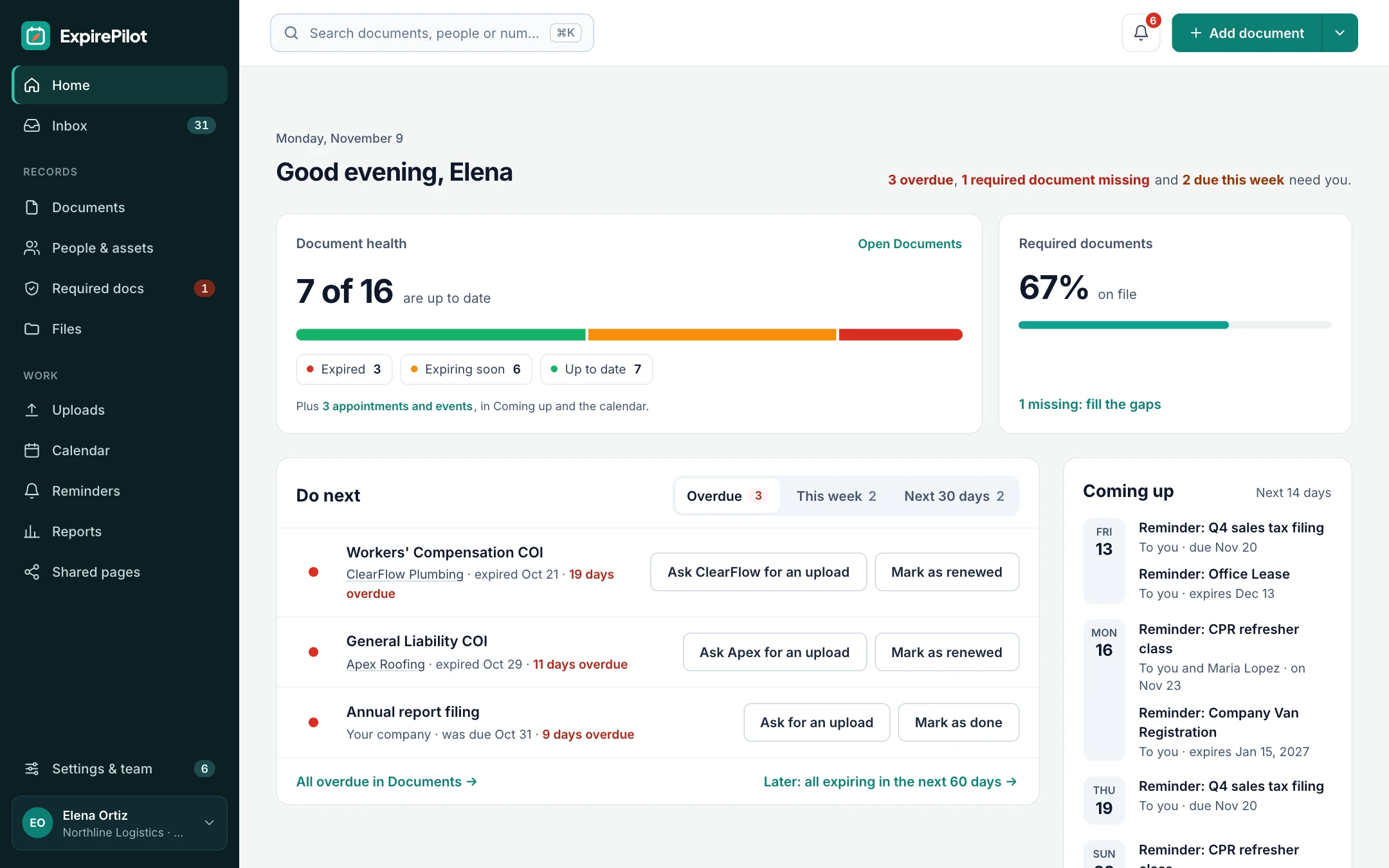
ExpirePilot is expiration tracking software built for small and mid-sized businesses. It keeps every license, certification, certificate of insurance (COI), contract, permit and registration in one place, and sends reminders before anything lapses. When nobody acts, it keeps following up. Most teams use it to replace a spreadsheet, a shared calendar, or a folder of PDFs that nobody checks.
Setup is quick with ExpirePilot. Just import your existing spreadsheet, or upload a document and let AI fill in the details. Then, you can choose who gets reminded and when. You can start on the free plan, or try every Business feature free for 14 days.
Key features
Automatic reminder sequences. Simply set reminder intervals that suit each document type, such as 60, 30, 14, and 7 days before expiry, then on the day and after it lapses. Reminders go straight to the right people automatically, whether that’s your team, the employee, or the vendor. Learn more about how expiration reminders work.
Escalation when nobody acts. If your reminder is ignored, ExpirePilot escalates it to the person’s manager and then to the account Owners. Renewals stop slipping through just because one inbox missed them. See how reminder escalation works.
AI document scanning on every plan. You can upload a PDF or a photo of a license, certificate, or COI. ExpirePilot reads it and fills in the document type, holder, number and expiration date for you. A person always reviews the details before saving, so nothing goes in unchecked. Read more about AI document scanning.
Upload links for vendors and employees. You can send a secure link and the person uploads their renewed document directly, with no account and no password. New uploads land in a review queue, so you have to approve them before they replace the old record. Learn more about document upload links.
Required documents and checklists. Define what each employee, contractor, or vendor must keep on file, like a COI, a W-9, and a license. ExpirePilot shows at a glance who is missing what. See required documents.
Proof that reminders went out. The reminder log records every email sent, plus whether it was opened and clicked. When your auditor or client asks how you track compliance, you can show them.
Audit-ready reports. Run reports for expiring, expired, by person, by vendor or by document type, or build your own with custom filters, columns and grouping. Save reports for your team, and export to Excel, CSV, or PDF. Explore audit reports.
Works with the tools you already use.
- Spreadsheet import and export
- Private calendar feed for Google Calendar, Outlook, and Apple Calendar
- API for connecting other systems
Team roles and free viewers. You can give each person the right access: Owner, Admin, Member or Viewer. View-only users are free and unlimited on every plan, so your managers and auditors can see the dashboard without adding to the bill.
Security built in. Every company’s data is kept separate. Files are stored privately, and two-step verification is available for every user.
Pros
- Lowest-priced paid plans of any business tool in this list
- AI document scanning on every plan, including Free
- Escalation and vendor upload links come built in, not as add-ons
- Unlimited free view-only users
- Fast setup with spreadsheet import and AI scanning
- 14-day free trial of every Business feature, with no credit card needed
Cons
- It’s a newer product, so it has fewer third-party reviews than long-established tools.
Who it’s best for
ExpirePilot suits small and mid-sized businesses that track documents for employees, contractors, and vendors. That includes construction firms checking subcontractor COIs, healthcare and staffing teams tracking licenses and certifications, and property managers and MSPs keeping on top of contracts and renewals. It’s also a natural next step for any team that has outgrown an expiration spreadsheet.
Pricing
| Plan | Price per month | Tracked items | Editing users | AI scans per month |
|---|---|---|---|---|
| Free | $0 | 20 | 1 | 10 |
| Basic | $15 | 250 | 1 | 50 |
| Professional | $39 | 800 | 3 | 200 |
| Business | $79 | 2,000 | 6 | 500 |
| Enterprise | $159 | 5,000 | 15 | 1,500 |
Yearly billing gives you one month free, and every plan includes unlimited free view-only users. See all plans on the pricing page.
2. Expiration Reminder
It’s a long-established expiration tracking platform with email and SMS reminders, AI document scanning, many HR and CRM integrations, and native mobile apps.
- Best for: Larger organizations with formal compliance needs.
- Price: Expiration Reminder starts at $49 per month for the Basic plan, with Standard at $149, Professional at $299, and Business at $499. A free trial is available.
- Stands out: Wide range of integrations, plus native iOS and Android apps.
- Watch out for: There’s no free plan, and SMS credits only start on the $149 Standard plan, which comes with 250 SMS credits.
3. Remindax
Web-based expiration reminder tool with a free plan and calendar and project-tool integrations.
- Best for: Teams that can run their week from Google Calendar, Outlook, Asana, or Trello.
- Price: There’s a free plan with 25 tracked items and 5 contacts. Paid plans start at $29 per month on Capterra’s listing.
- Stands out: Calendar sync and Zapier, Asana, and Trello connections.
- Watch out for: Free plan is small, and there’s no built-in AI scanning to capture dates from documents.
4. ExpiryEdge
It’s an expiration tracker for business licenses, permits, insurance and contracts – and has a dashboard, a calendar view and a list of upcoming reminders.
- Best for: Businesses that mainly need to keep operating licenses and permits current.
- Price: Pricing details for this product aren’t currently available on G2. See the vendor’s website.
- Stands out: Color-coded priorities, ownership assignments, and a clear calendar of deadlines.
- Watch out for: It’s a newer product with no public reviews yet.
5. ExpiryScan
ExpiryScan is an expiration tracker built around capturing dates from uploaded documents.
- Best for: Teams that want to scan documents rather than type dates in.
- Price: See the vendor’s website.
- Stands out: Document scanning is central to how it works.
- Watch out for: There’s little independent information or review data available yet.
6. RemindCal
RemindCal is an expiration reminder software that tracks contracts, licenses, permits, and compliance deadlines, sending automated email and SMS alerts.
- Best for: Small businesses that want simple, dated alerts.
- Price: See the vendor’s website.
- Stands out: Email and SMS alerts in a lightweight tool.
- Watch out for: It has fewer workflow features, like escalation or vendor uploads, than fuller platforms.
7. Contract Hound
Contract Hound is more of a contract management tool that stores contracts and sends alerts before renewal and notice dates.
- Best for: Teams whose main concern is contract renewals.
- Price: 14-day free trial is available. 50 Contracts: $95 per month and 100 Contracts: $190 per month.
- Stands out: It’s built for contracts, with renewal and notice-period tracking.
- Watch out for: Pricing grows with the number of contracts, and it isn’t built for certifications, licenses, or COIs.
8. GetReminded
GetReminded is a free mobile app for personal and household renewals. It can help its users manage the expiry dates of all personal and household service contracts, plans, policies, and identity documents.
- Best for: Individuals tracking passports, car registrations, insurance, and bills.
- Price: Free.
- Stands out: Simple, free app for iPhone and Android.
- Watch out for: It isn’t built for teams or business compliance, and a March 2026 review reports the app was down for weeks with no support response.
9. Microsoft Lists / SharePoint (DIY)
You can build your own expiration tracker in Microsoft Lists, then you can send reminder emails or Teams messages with a Power Automate flow.
- Best for: IT and operations teams already on Microsoft 365 who are happy to build and maintain their own setup.
- Price: Included with most Microsoft 365 business plans.
- Stands out: No new software to buy, and your data stays in your Microsoft 365 tenant.
- Watch out for: Someone has to build and maintain the flows, as there’s no AI scanning, vendor upload links, escalation or reminder log out of the box.
Can you track expiration dates for free in Excel or Google Sheets?
Yes. A spreadsheet with an expiration date column, a “days left” formula and color coding is a good free way to start. It tracks dates well, but it can’t send reminders or chase anyone on its own.
Create one row per document, with columns for the document, the person or vendor, the expiration date (column C), days left (D), status (E) and who owns the renewal. Then add two formulas and copy them down:
Days left (D2):  =IF(C2="","",C2-TODAY())
Status (E2):     =IF(C2="","",IF(C2<TODAY(),"Expired",IF(C2-TODAY()<=30,"Expiring soon","Active")))
Both Excel and Google Sheets recalculate these every day. Add conditional formatting so “Expired” rows turn red, “Expiring soon” amber and “Active” green, and sort by expiration date so the most urgent items sit at the top. To skip the setup, download one of our free expiration tracking templates for Excel and Google Sheets, such as the contract tracking template or the software license tracking template.
When a spreadsheet stops working. Most teams switch to expiration reminder software when:
- Nobody opens the sheet. The dates are there, but no one checks them until something has already lapsed.
- You’re chasing other people. Employees and vendors need reminders and a simple way to send in renewed documents.
- Reminders get ignored. You need follow-ups and escalation to a manager, not a single alert.
- An auditor or client asks for proof. A spreadsheet can’t show that reminders were sent, opened and acted on.
What’s the difference between business and personal expiration reminder apps?
Business expiration reminder software tracks documents for many people at once and proves the work was done. It has team roles, reminders to employees and vendors, upload links, escalation, reports and an audit trail. Tools like ExpirePilot, Expiration Reminder and Remindax are built for this.
Personal apps such as GetReminded track one person’s or household’s renewals, like passports, driver’s licenses, car registrations, insurance policies and warranties. They’re usually free phone apps with push notifications, but no sharing, reporting or vendor features.
A third group of apps tracks product expiry dates for food, medicine and retail stock. Those are a different category, so they aren’t covered in this guide.
What should you look for in expiration reminder software?
Before you choose a tool, check these seven things against how your team actually works:
- Reminder timing and channels. Can you set several reminders per document, before and after the date, and send them to the right people by email, SMS or other channels?
- Escalation. Does it follow up or notify a manager when a reminder is ignored?
- Document capture. Can it read dates from uploaded PDFs and photos, or does someone type every date in?
- Vendor and employee uploads. Can people send in renewed documents themselves, without an account?
- Reports and proof. Can you show an auditor what’s expiring, what’s missing and which reminders were sent?
- Real cost. Check the item limits, user limits and whether view-only users cost extra, not just the starting price.
- Integrations and data. Does it import your spreadsheet, connect to your calendar and offer an API?
If you track one kind of document heavily, compare tools against that use case, for example permit tracking, training tracking, software renewal tracking or lease renewal tracking.
How much does expiration reminder software cost?
Most expiration reminder software costs between $15 and $500 per month. Free plans exist for small lists, small-team plans usually cost $15 to $50 a month, and compliance suites for larger organizations run from about $150 to $500 a month.
- Free: ExpirePilot (20 items), Remindax (25 items) and personal apps like GetReminded. A spreadsheet template is also free.
- Small teams, $15 to $50 a month: ExpirePilot Basic ($15) and Professional ($39), Remindax from $29, and Expiration Reminder Basic ($49).
- Larger teams, $79 to $500 a month: ExpirePilot Business ($79) and Enterprise ($159), Expiration Reminder Standard ($149) to Business ($499), and Contract Hound from $95 for 50 contracts.
How we compared these tools
We compared each tool on price, free plan, alert channels, AI date capture, vendor and employee uploads, integrations and the kind of team it suits. Competitor details come from each vendor’s public information and software directories such as Capterra and G2, checked in November 2026. We’ll update this guide as prices and features change.
ExpirePilot is our product, and we’ve ranked it first. Every other tool is described as fairly as we can from public information. If you spot something out of date, email support@expirepilot.com.
14-day free trial · No credit card
Stop tracking expirations in spreadsheets
Keep every license, certification, COI and contract in one place, with automatic reminders, escalation and vendor upload links. Try every Business feature free for 14 days, then stay on the Free plan or pick a paid plan.
✓ No credit card needed ✓ Free plan after the trial ✓ Nothing is deleted


How Long Is a W-9 Good For? (2026 Guide)
How long is a W-9 good for?
Form W-9 does not expire. A W-9 stays valid for as long as the payee’s name, taxpayer identification number (TIN), tax classification, and address on the form are still correct.
You need a new W-9 when any of those details change, or when the IRS sends you a B-notice saying the name and TIN on a 1099 don’t match its records.
The IRS puts no expiration date on Form W-9 and does not require payers to collect a new one every year. A W-9 signed in 2019 can still be valid in 2026 if nothing on it has changed. A W-9 becomes outdated because the details on it change, not because of its age.
Foreign payees use different forms, and those do expire. Form W-8BEN is generally valid until December 31 of the third calendar year after the year it was signed, so a W-8BEN signed in March 2026 stays valid through December 31, 2029.
When do you need a new W-9?
You need a new W-9 when something on the form you have is no longer true, or when the IRS tells you the name and TIN don’t match. The IRS doesn’t expect you to ask every vendor for a new form each year. Request a new W-9 in these situations:
- The payee’s legal name changes. This covers marriage, divorce, a business rename, or a new legal entity name. The name on line 1 has to match the name the IRS has for that TIN. A new DBA on its own goes on line 2 and usually doesn’t change the match.
- The TIN changes. For example, a sole proprietor who gets an EIN, or a business that restructures into a new entity with a new EIN, needs to give you a new W-9 with the new number.
- The federal tax classification changes. Examples include a sole proprietorship becoming an LLC, an LLC electing S-corp or C-corp taxation, or a partnership converting to a corporation. The classification helps decide whether the payee is exempt from 1099 reporting, so it matters.
- The address changes. The IRS doesn’t strictly require a new W-9 for a move, but most AP teams ask for one so the 1099 goes to the right place. The payee writes “NEW” at the top of the form if the address differs from the one you have on file.
- You get a B-notice from the IRS. A CP2100 or CP2100A notice means the name and TIN on a 1099 you filed don’t match IRS records.
First notice: send the payee a copy and ask for a corrected W-9. If they don’t respond in time, you have to start backup withholding at 24%.
Second notice within three years: a new W-9 isn’t enough. The payee has to prove their TIN with a letter from the Social Security Administration (for an SSN) or IRS Letter 147C (for an EIN).
- The form on file is incomplete or unsigned. A W-9 with no TIN, no classification box ticked, a crossed-out certification, or no signature where one is required can’t be relied on. Ask for a complete one.
- The payee’s exempt status or line 3b answer changes. This mostly affects corporations claiming an exempt payee code, and partnerships, trusts, or LLCs that gain or lose foreign partners, owners, or beneficiaries.
- Your own policy says so. Many companies ask for a new W-9 every two to three years, when a vendor comes back after a long break, or when they move to a new AP or payment system. The IRS doesn’t require this, but it catches changes vendors forget to report.
Rule of thumb: if the payee would fill in the form differently today than they did when they signed it, you need a new one.
Only the payee can fix a name or TIN problem. Don’t edit a W-9 yourself, even if you know the correct details. Ask the payee to fill in and sign a new form. A document upload link lets the vendor send the corrected form straight to you instead of by email.
Can you use an old W-9?
Yes. An old W-9 is still usable if the information on it is correct and the form was filled in completely. The date on the form doesn’t make it invalid. A W-9 signed five or ten years ago is still good if the payee’s name, TIN, tax classification, and address haven’t changed.
Does a W-9 on an older revision still count?
Yes. The IRS updated Form W-9 in March 2024, the first update since 2018. The main change was a new line 3b for partnerships, trusts, and estates with foreign partners, owners, or beneficiaries. Payers are not required to collect new Forms W-9 just because the IRS released a new revision. A W-9 on the 2018 or an earlier revision stays valid as long as its details are still accurate.
When an old W-9 is not good enough
Ask for a new W-9, even if the old one looks fine, when:
- The payee is a partnership, trust, or LLC taxed as a partnership, and you need its line 3b answer.
- The form is missing a signature, TIN, or tax classification.
- You got an IRS B-notice for that payee.
- You know the vendor has changed its name, structure, or address since signing.
- You can’t tell whether the old form belongs to the same legal entity you’re paying now (for example, after a merger or acquisition).
Best practice for old W-9s
Keep accepting old W-9s from existing vendors when nothing has changed, and use the current revision for every new vendor. Then use your next scheduled vendor review, or the first change a vendor reports, to replace forms older than your refresh policy.
Key point: an old W-9 is a problem only when the facts on it are out of date, not when the paper is.
Which W-9 revision is current?
As of November 2026, the current final revision is Form W-9 (Rev. March 2024). The IRS has published a draft revision dated June 2026, which adds a checkbox for digital asset brokers and updates the instructions for 2026 law changes, including the new $2,000 reporting threshold for most 1099-NEC and 1099-MISC payments. The draft is marked “DO NOT FILE”, so don’t send it to vendors.
Before you send a blank W-9 to a new vendor, check irs.gov/FormW9 for the latest final version. When the new revision becomes final, you still don’t need to replace W-9s you already hold.
How to check if a W-9 is valid
A valid W-9 has the payee’s correct legal name, a TIN that matches that name in IRS records, a tax classification, and a completed certification. To check one, review the form line by line, then confirm the name and TIN with the IRS TIN Matching program.
Step 1: Review the form line by line
| Line | What to check | Common problem |
|---|---|---|
| Line 1: Name | The legal name that matches the TIN. For a sole proprietor, the owner’s own name. For a single-member LLC that is a disregarded entity, the owner’s name. | The business or DBA name on line 1 with the owner’s SSN |
| Line 2: Business name | DBA or disregarded entity name, if any. It can be blank. | The legal name here and the DBA on line 1 |
| Line 3a: Tax classification | Exactly one box ticked. An LLC also enters C, S, or P. | No box ticked, or “LLC” ticked with no letter |
| Line 3b: Foreign partners | Ticked only by partnerships, trusts, or estates with foreign partners, owners, or beneficiaries (Rev. March 2024 and later) | Missing because the form is on an older revision |
| Line 4: Exemptions | An exempt payee code only if one applies. Most individuals leave it blank. | A code the payee doesn’t qualify for |
| Lines 5–6: Address | The mailing address for the 1099 | An old address, or no “NEW” note after a move |
| Part I: TIN | An SSN or EIN with 9 digits that belongs to the line 1 name | An LLC’s EIN entered for a disregarded entity, or digits missing |
| Part II: Certification | Signed and dated. Item 2 crossed out only if the payee was told they are subject to backup withholding. | No signature, or the whole certification crossed out |
Step 2: Confirm the name and TIN with IRS TIN Matching
The IRS TIN Matching program lets payers who file Forms 1099 check whether a name and TIN combination matches IRS records before filing. It runs through IRS e-Services, and you have to register first.
Interactive matching checks up to 25 name/TIN pairs at a time and answers within seconds. Bulk matching handles up to 100,000 pairs in a text file, with results within 24 hours. A mismatch means you should contact the payee and request a corrected W-9 before you file the 1099.
Step 3: Check the signature rules that apply to you
For most payments to contractors and vendors, the IRS requires a correct TIN, but the payee only has to sign the certification if they were previously told they gave an incorrect TIN. Interest, dividends, and certain other payments always need a signature.
Most AP teams require every W-9 to be signed anyway, because a signed certification protects the payer if the TIN later turns out to be wrong. Electronic signatures are allowed if your system meets the IRS requirements for electronic W-9s.
Step 4: Store the result
Record the date you checked the W-9, the TIN Matching result, and who reviewed it. That record shows you acted in good faith if the IRS later questions a 1099. Keeping it with the form also makes audit reports easy to pull when an auditor asks for vendor files.
What a valid W-9 does not prove: a W-9 confirms a payee’s TIN and tax status. It doesn’t confirm that the vendor is licensed, insured, or legitimate. Check those documents separately, for example with COI tracking software for certificates of insurance and certification tracking software for licenses.
W-9 vs W-8BEN: which one expires?
A W-9 is for U.S. persons and never expires on its own. A W-8BEN is for foreign individuals and expires after a set period. Foreign entities use Form W-8BEN-E, which follows the same timing rule.
| Form W-9 | Form W-8BEN | |
|---|---|---|
| Who fills it in | U.S. persons: citizens, residents, U.S. companies, partnerships, trusts | Foreign individuals (foreign entities use W-8BEN-E) |
| What it does | Gives you the TIN for 1099 reporting | Certifies foreign status and any tax treaty claim |
| Expiration | None | December 31 of the third year after signing, in most cases |
| When to replace early | When the name, TIN, classification, or address changes | When a change in circumstances makes any information incorrect |
| Sent to the IRS? | No, the payer keeps it | No, the payer keeps it |
If you pay both U.S. and foreign vendors, the W-8BEN expiry dates are the ones that need a calendar. Missing one can mean withholding at 30% on payments to that vendor until a new form comes in.
For AP teams: how to keep vendor W-9s current
W-9s don’t expire, but your vendor files still go stale: vendors rename, restructure and move without telling you, W-8BENs run out, and certificates of insurance lapse. A folder of PDFs doesn’t remind anyone.
With ExpirePilot, you can:
- Make the W-9 one of the required documents for every vendor, and see which vendors are missing one.
- Set a review date per vendor (for example, every 3 years) and every W-8BEN’s expiry date, and get automated expiration reminders before they arrive, with reminder escalation to a manager if nobody acts.
- Send vendors a document upload link to return a new W-9, W-8BEN or COI.
- Use AI document scanning to read the dates from uploaded forms and certificates.
- Track vendor contract reminder dates in the same account, so renewals and paperwork come up together.
Stop chasing vendor paperwork by email
Keep every vendor’s W-9, W-8BEN and certificate of insurance in one place and get reminders before reviews and expirations come due. Try every Business feature free for 14 days, then stay on the Free plan or pick a paid plan.
✓ No credit card needed ✓ Free plan after the trial ✓ Nothing is deleted